
AnalyzeColonyGrowth
AnalyzeColonyGrowth[ColoniesAnalysis]⟹ColoniesGrowthAnalysis
filters the colonies of a single plate in ColoniesAnalysis based on morphology properties (diameter, separation, regularity and circularity), and then tracks the number and morphology changes of colonies. The colony growth analysis may be used to determine the termination of incubation for solid media samples.
AnalyzeColonyGrowth[AppearanceColoniesImages]⟹Object
examines AppearanceColoniesImages of a single plate to tracks the number and morphology properties (diameter, separation, regularity and circularity). If no colonies analysis is found, AnalyzeColonies are run automatically.
Details
Input

Output

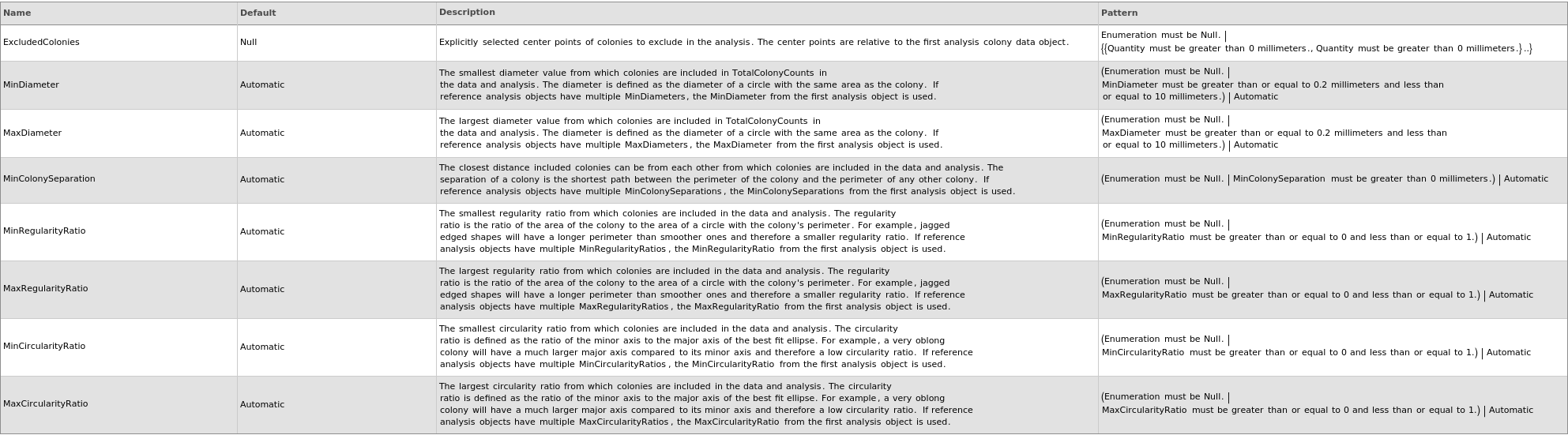
Filtering Options
Examples
open allclose allBasic Examples (4)
Additional Examples (3)
If input is appearance data and no colony analysis is associated with it, AnalyzeColonies is called to generate colony analysis on the fly:
If not all input appearance data are on the same orientation, the first BrightField image is used as reference to flip and shift later data:
If the second input colony analysis data has ReferenceImages with different orientation as the first data, the coordinates of colonies of the second analysis are rotated and shifted:




