Compute
Compute[Expression]⟹Job
generates a Manifold Job notebook where the statements in Expression make up the contents of the job's template notebook.
Compute[Page]⟹Job
generates a Manifold Job notebook using Page as the job's template notebook.
Details
- Compute generates a Manifold job object, which is used to run asynchronous computations on the ECL's cloud-computing platform, Manifold.
- Manifold jobs are templates that generate one or more Computation objects, which represent the evaluation of a notebook page or series of SLL commands.
- When a Job generates a Computation, the Computation is enqueued and executed on Manifold as soon as computational threads are available.
- Jobs can be configured to enqueue Computations as a one-off, at scheduled times, at repeating intervals, or in response to changes in objects or types.
Input

Output

Manifold Parameters Options

Organizational Information Options

Scheduling Options
Triggering Conditions Options

General Options

Attributes
-
Examples
Basic Examples (4)
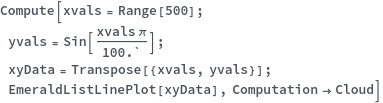
Compute a notebook page (evaluate each code and input cell in a notebook page sequentially) asynchronously on the cloud:
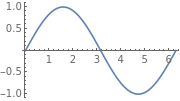
Compute a series of SLL expressions asynchronously on the cloud:
Create a job which runs the same computation once a week:
Schedule a computation to run exactly ten days from now:
Options (18)
Computation (2)
Run computation asynchronously on the cloud, returning a Job notebook from which computation results can be accessed:
Run computation in the current notebook, returning the output of the input expression(s):
EstimatedRunTime (1)
If computing on the cloud, specify the estimated run time of this computation. This run time will be used for scheduling:
HardwareConfiguration (2)
If computing on the cloud, specify what hardware configuration to use. The standard configuration is a Fargate cluster with 8GB RAM:
Request the HighRAM (24GB) hardware configuration for memory intensive computations:
MaximumRunTime (1)
If computing on the cloud, set the maximum run time for which instances of this computation may run for. If this run time is exceeded, the computation will terminate with status TimedOut:
MaximumThreads (1)
If computing on the cloud, specify the maximum number of computational threads that may be used:
Name (1)
If computing on the cloud, name the uploaded job object:
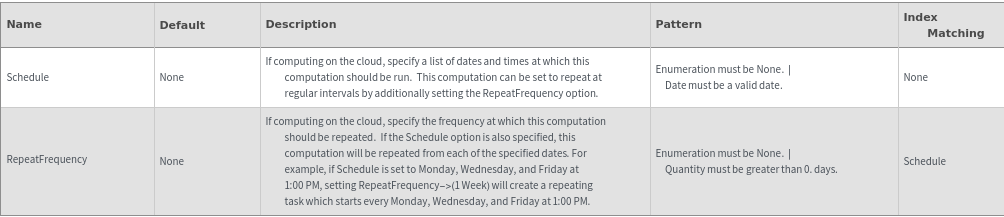
RepeatFrequency (1)
Schedule a job to run computations every week, starting from the current date and time:
Schedule (3)
If computing on the cloud, schedule a job to run two hours from the current time:
Schedule a job to run computations at multiple dates:
Schedule a job to run computations three times a week, on specific days:
TrackedFields (2)
Set up a Job which only runs computations when specific fields of a given object or objects are modified:
Set up a Job which only runs computations when specific fields of given types are modified:
Trigger (2)
If computing on the cloud, set up a Job which runs a computation every time a NMR Data object is modified. The modified objects may be referenced using $TrackedObjects:
If computing on the cloud, set up a Job which runs a computation every time a specific object is modified:
WaitForComputation (2)
Set WaitForComputation to False to run asynchronously (only supported when Computation->Cloud). The computation's status may be monitored from the resulting job notebook:
Set WaitForComputation to True to prevent evaluation of additional cells until the current computation has completed:
Attributes (1)
HoldFirst (1)
Compute has the attribute HoldFirst. The input expression will not be evaluated until the computation executes:
Messages (15)
CloudOnlyOptions (1)
Show an error when specified options are incompatible with local (in-notebook) computation:
DeveloperOnlyOptions (1)
Warning message shows if user without superuser privileges tries to change developer-only options:
EstimatedTimeExceedsMaximum (1)
Show an error and return $Failed if the supplied EstimatedRunTime exceeds the MaximumRunTime:
InvalidRepeat (1)
Only one RepeatFrequency can be specified if Schedule is either None or not provided:
InvalidSchedule (1)
None cannot be used if Schedule is set as a list:
InvalidTrackedFields (2)
When Trigger is a list of objects, this error shows if any of the TrackedFields are not fields of the provided objects:
When Trigger is a list of types, this error shows if any of the TrackedFields are not fields of the provided types:
InvalidTrackedFieldsLength (2)
The number of lists of TrackedFields must match the length of Trigger when objects are used:
The number of lists of TrackedFields must match the length of Trigger when types are used:
MaximumTimeExceeded (1)
Show an error and return $Failed if the supplied MaximumRunTime exceeds Manifold system limitations:
MaximumTimeTooSmall (1)
Show an error and return $Failed if the supplied MaximumRunTime is less than ten minutes:
NoTrigger (1)
If Trigger->None, the TrackedFields option will be ignored:
ObjectNotFound (1)
Error occurs if any of the objects specified in Trigger cannot be found in the database with DatabaseMemberQ[]:
RepeatFrequencyTooSmall (1)
Repeat frequencies must be larger than the maximum run time for a computation:
ScheduledDateInPast (1)
Scheduled start dates in the Schedule option must be in the future:
Last modified on Fri 20 May 2022 14:54:01