
DropShipSamples
DropShipSamples[OrderedItems, OrderNumber]⟹Transaction
generates a Transaction to track the user-initiated shipment of OrderedItems from a third party company to ECL.
DropShipSamples[Transaction]⟹UpdatedTransaction
update Transaction to add shipping information (such as tracking number, shipper, date shipped, and expected delivery date) or amount information (such as mass, volume, concentration, and mass concentration).
Details
- This function is intended to help you ship Products from Object[Company,Supplier]s or Models from Object[Company,Service]s.
- All Model input must have the Provider option specified, and Provider must be an Object[Company,Service].
- Product input is not required to have the Provider option specified. If it is specified, it must match the supplier of the product.
Input

Output

Organizational Information Options

Sample Information Options
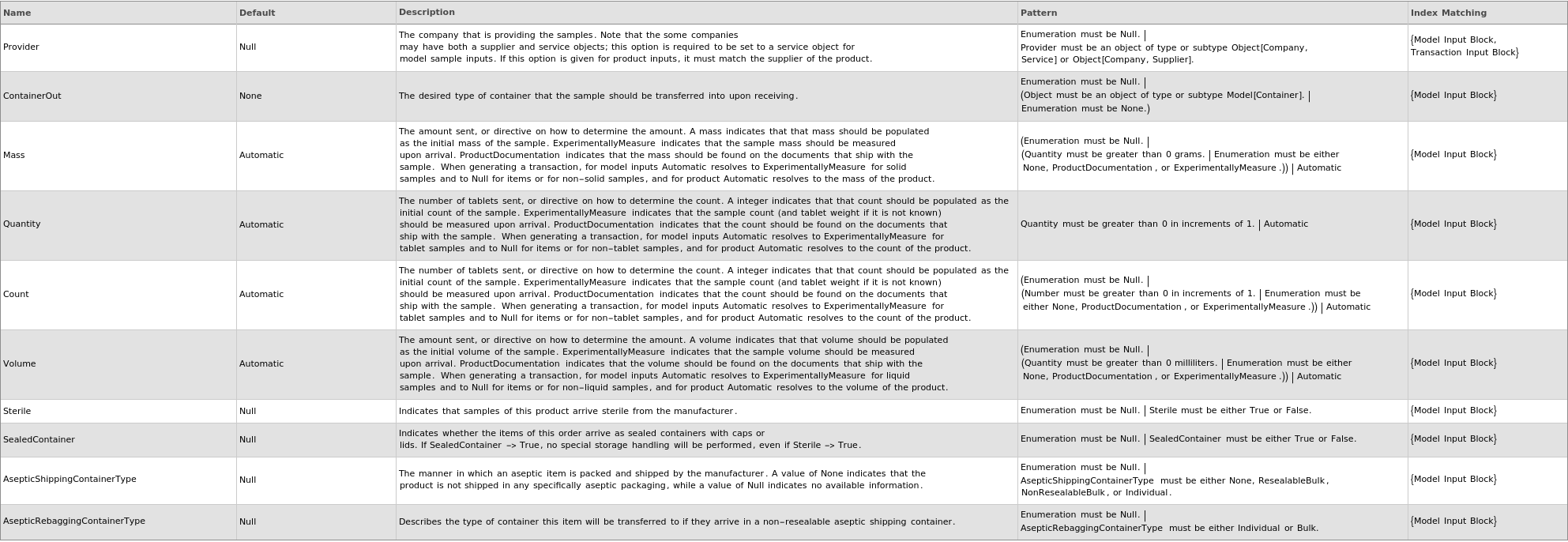
Shipment Options

Shipping Information Options

Examples
open allclose allBasic Examples (6)
Generates transaction objects to track products that were ordered by the user from a supplier:
Generates transaction objects to track sample models and products that were ordered by the user from a supplier or service company:
Generates transaction objects to track sample models that were ordered by the user from a service company:
Generates transaction object when ordering from a product that consists of a kit:
The DateCreated and DateOrdered of a transaction created by DropShipSamples are the same:
Additional Examples (5)
Amounts are pulled from products:
If a single order number is specified, uses that order number for all of the transactions:
If DateShipped is specified, the transaction Status is Shipped, DateShipped is populated, and DateOrdered remains blank; If DateShipped is not specified, the transaction Status is Ordered, DateOrdered is populated, and DateShipped remains blank:
If the specified service provider is not recorded for the specified model, update the model with the service provider:

Samples with the same provider, order number, and shipping information (if provided) are grouped into the same transaction:
Options (61)
AsepticRebaggingContainerType (1)
AsepticShippingContainerType (1)
ContainerOut (2)
Count (6)
CountSource automatically resolves to ExperimentallyMeasure for tablet model input and to None for all other samples. Count initializes to 0 for all of these cases:

If Mass is given and SolidUnitWeight is known, Count is calculated to resolve automatics:
Specify that the count of the sent samples should be found on the documentation that arrives with the sample:

Specify that the count of the sent samples should be measured upon arrival:
Specify the count of the samples that will be sent:

DateShipped (6)
Specify a date shipped for each object when generating a transaction:
Specify a date shipped for each object when updating shipping information:
Specify a date shipped for some but not all of the models when generating a transaction.:
Specify a date shipped when generating a transaction:
Specify a date shipped when updating shipping information:
When updating shipping information, Automatic DateShipped will leave the existing date shipped in place, Null will clear the existing date shipped and revert the transaction status to Pending, and a new date shipped will overwrite the old date shipped:
ExpectedDeliveryDate (7)
Specify an expected delivery date for each object when generating a transaction:
Specify an expected delivery date for each object when updating shipping information:
Specify an expected delivery date for some but not all of the models when generating a transaction.:
Specify an expected delivery date for some but not all of the objects when updating shipping information:
Specify an expected delivery date when generating a transaction:
Specify an expected delivery date when updating shipping information:
When updating shipping information, Automatic ExpectedDeliveryDate will leave the existing date expected in place, None will clear the existing date expected, and a new date expected will overwrite the old date expected:
Mass (7)
If Count is given and SolidUnitWeight is known, Mass is calculated to resolve automatics:

MassSource automatically resolves to ExperimentallyMeasure for solid model input and to None for all other samples. Mass initializes to 0 gram for all of these cases:

Specify different mass options for each input:
Specify that the mass of the sent samples should be found on the documentation that arrives with the sample:
Specify that the mass of the sent samples should be measured upon arrival:
Name (3)
Provider (1)
Quantity (2)
ReceivingTolerance (1)
ShippedRack (1)
Shipper (7)
Specify a shipper for each object when generating a transaction:
Specify a shipper for each object when updating shipping information:
Specify a shipper for some but not all of the models when generating a transaction.:
Specify a shipper for some but not all of the objects when updating shipping information:
Specify a shipper when generating a transaction:
Specify a shipper when updating shipping information:
When updating shipping information, Automatic Shipper will leave the existing Shipper in place, None will clear the existing Shipper, and a new Shipper will overwrite the old Shipper:
TrackingNumber (7)
Specify a tracking number for each model when generating a transaction:
Specify a tracking number for some but not all of the models when generating a transaction.:
Specify a tracking number when generating a transaction:
Specify a tracking number when updating shipping information:
Specify tracking numbers for each transaction when updating shipping information:
Specify tracking numbers for some but not all of the transactions when updating shipping information:
When updating shipping information, Automatic TrackingNumber will leave the existing tracking number in place, Null will clear the existing tracking number, and a new tracking number will overwrite the old tracking number:
Volume (6)
Specify different volume options for each input:
Specify that the volume of the sent samples should be found on the documentation that arrives with the sample:
Specify that the volume of the sent samples should be measured upon arrival:

Specify the volume of the samples that will be sent:
Update the volume of models in an existing transaction:
VolumeSource automatically resolves to ExperimentallyMeasure for liquid model input and to None for all other samples. Volume initializes to 0 gram for all of these case:

Messages (40)
CompanyRequiredForModelInputs (2)


ContainerOutInconsistent (1)


ContainerOutNotValidated (1)

CountDiscrepancy (2)



CountNotRequired (2)


IncompatibleProvidedRackModel (1)


InputLengthMismatch (1)




MassCountDisagree (1)


MassDiscrepancy (2)


MassNotRequired (2)

MeasurementMayRequireTransfer (2)
When generating a transaction, if mass or volume is specified as ExperimentallyMeasure, throw a warning that the samples may be transferred to a different container:
When updating a transaction, if mass or volume is specified as ExperimentallyMeasure, throw a warning that the samples may be transferred to a different container:

ModelsHaveConflictingCount (2)



ModelsHaveConflictingMass (2)


ModelsHaveConflictingVolume (2)



NewServiceProviderForModel (1)
NoCompatibleRack (1)

OptionLengthMismatch (1)

OptionMustMatchModelsInTransactions (1)

ProductSupplierConflict (1)


SampleMayBeTransferred (2)
When generating a transaction, if volume is specified for a liquid model but the model does not have density, give a warning that the samples may still be transferred depending on the container it arrives in:

When updating a transaction, if volume is specified for a liquid model but the model does not have density, give a warning that the samples may still be transferred depending on the container it arrives in:








