Email[recipients]⟹emailResult
sends an email to recipients.
Details
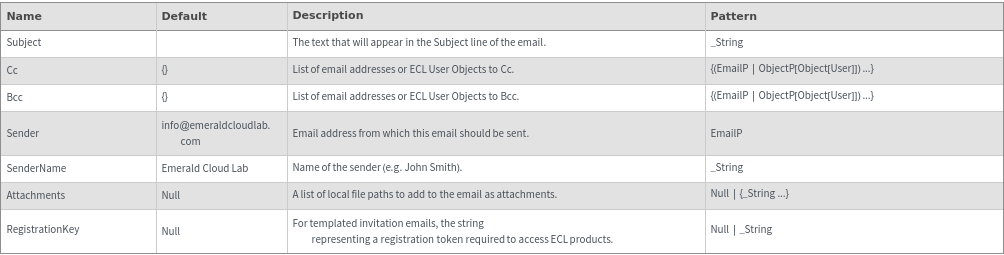
- Email send requests will only be submitted to the server if the current session is against the production ECL database.
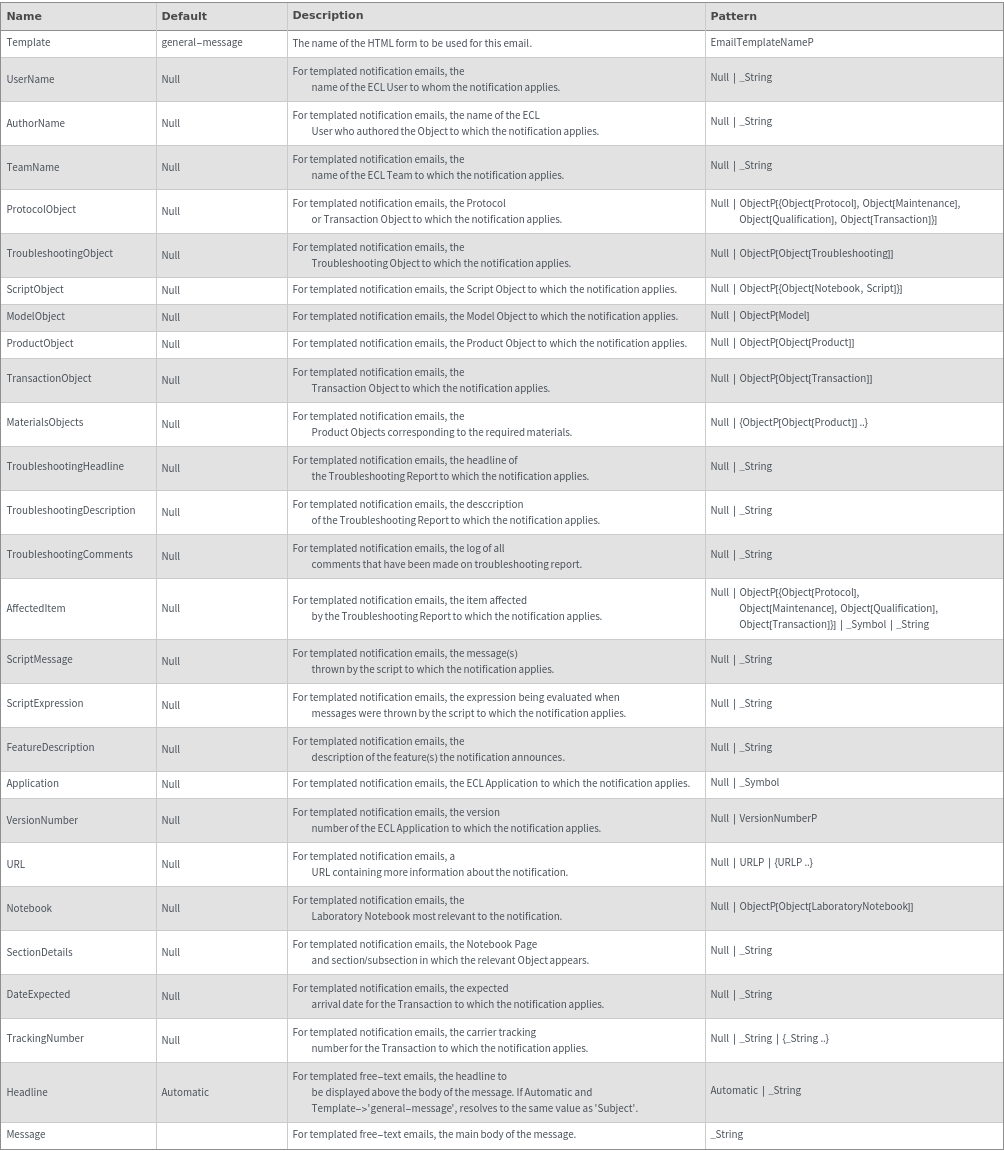
- Email requests with Template specified will use SendGrid templates to produce richly formatted emails.
- Template field options longer than 7000 characters will be truncated to avoid exceeding the SendGrid max size of 10000 bytes per substitution.
- If the Headline option is not specified for a 'general-message' email (free text), the value of the Subject option will be used.
- The following options are expected in particular combinations depending on the specified Template option. Each template requires a specific set of fields, as specified below:
-
Template nameTemplate descriptionOptions required
admin-added Announces addition of a new administrator torom a team. {UserName, TeamName} ecl-invite Announces that a user has been invited to the ECL. {UserName, TeamName} ecl-welcome Welcomes a new user to the ECL. {URL} general-message A generic template for any free-text email. {Headline, Message} materials-required Announces that additional non-stocked materials are required to run a protocol. {Notebook, SectionDetails, MaterialsObjects} model-approved Announces that a user-created model has been approved for use. {Notebook, SectionDetails, ModelObject} product-approved Announces that a user-created product has been approved for use. {Notebook, SectionDetails, ProductObject} notebook-added Announces that a notebook has been added to a team. {Notebook, TeamName} notebook-removed Announces that a team no longer has access to a notebook. {Notebook, TeamName} order-backordered Announces that an order has been marked as backordered by the supplier. {Notebook, SectionDetails, TransactionObject, DateExpected} order-canceled Announces that an order has been canceled. {Notebook, SectionDetails, TransactionObject} order-placed Announces that an order has been placed. {Notebook, SectionDetails, TransactionObject} order-received Announces that an order has been received and is ready for use. {Notebook, SectionDetails, TransactionObject} protocol-aborted Announces that a protocol's execution has been aborted. {Notebook, SectionDetails, ProtocolObject, AuthorName, TroubleshootingHeadline} protocol-added-to-cart Announces that a protocol has been added to a team's cart. {Notebook, SectionDetails, ProtocolObject, AuthorName} protocol-canceled Announces that a protocol has been canceled by the user. {Notebook, SectionDetails, ProtocolObject, AuthorName} protocol-completed Announces that a protocol's execution has been completed. {Notebook, SectionDetails, ProtocolObject, AuthorName} protocol-enqueued Announces that a protocol has been added to the execution queue. {Notebook, SectionDetails, ProtocolObject, AuthorName} protocol-processing Announces that execution of a protocol has begun in the lab. {Notebook, SectionDetails, ProtocolObject, AuthorName} samples-returned Announces that a shipment of user samples has been sent from ECL. {Notebook, SectionDetails, TransactionObject, UserName, TrackingNumber, URL} samples-shipped Announces that a user has notified ECL of an incoming shipment of samples. {Notebook, SectionDetails, TransactionObject} software-new-features Announces the addition of new features to the ECL. {FeatureDescription} software-update Announces that one of the ECL applications has been updated to a new version. {Application, VersionNumber, FeatureDescription, URL} team-member-added Announces that a new member has been added to a team. {UserName, TeamName} team-member-removed Annoucnes that a member has been removed from a team. {UserName, TeamName} troubleshooting-reported Announces that a troubleshooting report has been filed for a protocol. {Notebook, SectionDetails, ProtocolObject, AuthorName, TroubleshootingObject, TroubleshootingHeadline, TroubleshootingDescription} troubleshooting-report-reopened Announces that a previously completed troubleshooting report has been reopened. {Notebook, SectionDetails, ProtocolObject, AuthorName, TroubleshootingObject, TroubleshootingHeadline, TroubleshootingDescription} troubleshooting-report-resolved Announces that a troubleshooting report has been resolved. {Notebook, SectionDetails, ProtocolObject, AuthorName, TroubleshootingObject, TroubleshootingHeadline, TroubleshootingDescription} troubleshooting-report-updated Announces new activity (ECL staff comments or actions) on an open troubleshooting report. {Notebook, SectionDetails, ProtocolObject, AuthorName, TroubleshootingObject, TroubleshootingHeadline, TroubleshootingDescription} -
AttachmentFileDoesNotExist The attached file(s) `1` does not exist. Please check the file path provided and try again. AttachmentFileTypeNotSupported The attached file(s) `1` is not supported. Please check the list of supported file types by calling SupportedEmailAttachmentTypeP. IncompleteTemplateFields The specified email template, '`2`', requires non-Null values for the options `1`, but one or more of these options is Null: `3`. Please verify that all of the required information has been provided. InvalidTemplate The specified email template, '`1`', is not a valid email template name. Please confirm that the provided email template matches EmailTemplateNameP. MailServerError The server returned an error in response to the request to send email: `1`. Please confirm that specified input includes all required information and is formatted properly.
Input

Output

TemplateEmail Options
General Options