ecl-logo Documentation

Login

Login[email,password]success

signs in to the ECL using your email and password.

Login[token]success

signs in to the ECL using the pre-created authorization token.

Login[]success

signs in to the ECL by prompting for an email and password.

Details

  • Users must login before accessing any data in the ECL (via Download, Upload, and similar functions).
  • Returns $Failed if there was an error logging in.
  • Returns $Canceled if the user cancels log in
  • Input
    Output
    General Options
    Messages
  • Server`1`

Examples

Basic Examples  (2)

Returns true with valid username and password:

Prompt for username & password:

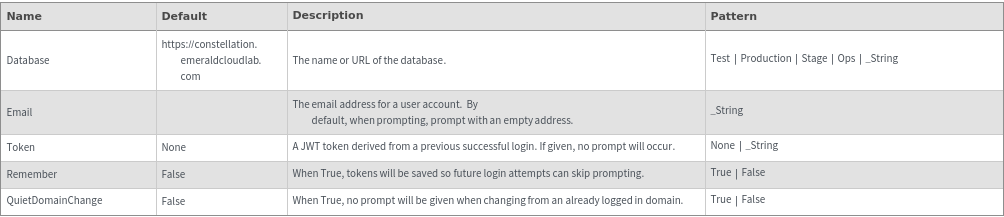
Options  (6)

Database  (2)

The database can be specified as an option:

The database option can accept a domain as a string:

Email  (1)

Passing only the email option will prompt for password:

QuietDomainChange  (1)

When changing domains, prompt for approval:

Remember  (1)

Remembered logins will not prompt a second time:

Token  (1)

Login using a previously generated authorization token:

Messages  (2)

NotLoggedIn  (1)

Returns $Failed if username and/or password does not match:

Server  (1)

Returns $Failed if there is an error communicating with the server: