
RecordSensor
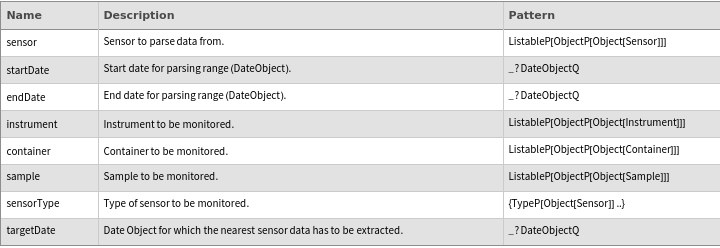
RecordSensor[sensor]⟹object
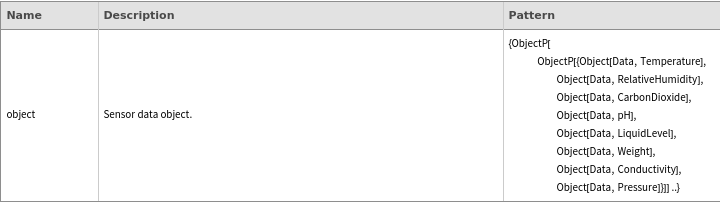
generates a data object containing any data currently being measured by the provided sensor at the time the function is executed.
RecordSensor[sensor, Span[startDate,endDate]]⟹object
generates a data object containing measurements from the sensor from the startDate to the endDate.
RecordSensor[sensor, targetDate]⟹object
generates a data object containing all the measurements from the sensor on the given targetDate.
RecordSensor[instrumentcontainersample, sensorType, Span[startDate,endDate]targetDate]⟹object
generates a data object containing measurements from a sensor of the given sensorType monitoring the provided instrument, container, or sample on the provided targetDate or from the provided startDate to the provided endDate.
RecordSensor[instrumentcontainersample, Span[startDate,endDate]targetDate]⟹object
generates a data object containing measurements from all of the sensors monitoring the provided instrument, container, or sample on the provided targetDate or from the provided startDate to the provided endDate.
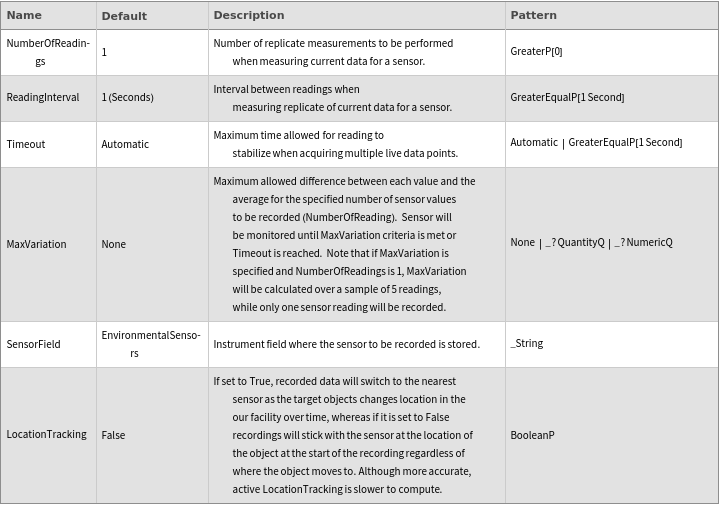
If LocationTracking option is set to False (default): |
| - Only historical data from the sensors currently monitoring the 'target' will be returned. |
| - Faster to execute. |
If LocationTracking option is set to True: |
| - RecordSensor will track the location of the target between the 'startDate' and 'endDate' output data for the sensor monitoring the target at all time. |
Input
Output
General Options
Messages
| InactiveSensor | Sensors must be of Active Status in order to record from them. Status of Sensor `1` is currently marked as '`2`'. | |
| InvalidDailyLogDate | Can not record a full daily log of the present day (must be at least one day in the past). | |
| InvalidDateOrder | End date has to be later than start date. | |
| InvalidMaxVariationUnits | Units for MaxVariation option do not match the output units for that sensor. | |
| InvalidOption | '`1`' does not apply to historical data (only current measurements). | |
| InvalidSensorFieldName | There is no '`1`' field in the '`2`' instrument object. | |
| InvalidTargetDate | Target date has to be in the past. | |
| NoData | No sensor data was found for the selected date(s), so the sensor may not have been Active at that time. | |
| NoEnvironmentalSensorforTarget | No environmental sensors are currently monitoring '`1`'. Report this event to the scientific development team. | |
| NoNetworkConnection | Unable to establish connection to the network drive. Please double check that the computer has access to the path '`1`' or consult the IT manager. | |
| NoSensorForLocation | Unable to find active sensors of type '`1`' moniting the object '`2`' at the requested time. Perhaps try a different date or sensor type. | |
| TimeoutReached | Timeout reached. Sensor output did not stabilized within specified parameters during the allocated time. Please file a ticket. | |
| WebServiceUnavailable | The Twincat Web service cannot be reached from this client. Please consult the IT manager. |
Record current data from sensor object (singleton) :


Record data from single sensor over time span :


Record data at specific time point for one sensor:


Record current data from sensor packet (singleton) :


Record current data from sensor objects :


Record data from multiple sensors over time span :


Record data at specific time point for multiple sensors:

Record data for a day for one single sensor:



Record data for a day for multiple sensors:


Record live environmental data on a target:


Record live environmental data on a specific sensor on a target:


Record environmental data on a target over span:


Record environmental data on multiple targets over span:


Record environmental data on a specific sensor on a target over span:


Record data objects that will eventually be parsed in future queries looking into historical data:


Record data from single sensor over time span using fast track :


Record data from single sensor over time span using location tracking :

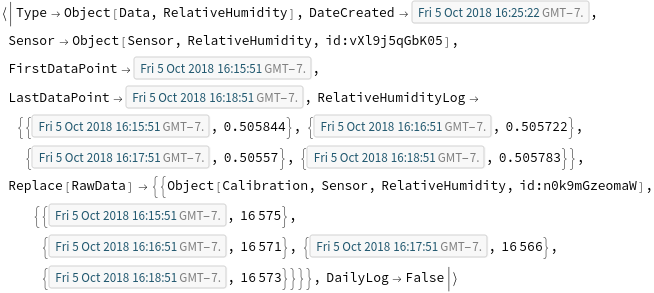
Record data from instrument sensor, specifying MaxVariation:


Specify NumberOfReading when looking at sensor field :


Output values only over time span:


Record data from instrument sensor, specifying Reading Interval and NumberOfReadings:


Record environmental data on a specific sensor on a target over span:

Record data from instrument sensor, specifying Timeout:


Upload data object:


Query data from an sensor object that is not Active:


Throw an error if trying to record a daily log of the current day:


Throw an error if end date is prior to start date:


Throw an error if the units specified for MaxVariation is incorrect:


Throw an error if the units specified for MaxVariation is incorrect:
Throw an error if options for live data are specified in historical data overload:


Invalid SensorField name:


Throw an error if target date is not in the past:


Throw an error if no data for specified date range:

There are no sensor monitoring a target:


User does not have access to the public drive:


Throw an error if there is no sensor monitoring the target:


Throws an error if Timeout is reached before a data is recorded:


Throws a relevant message if web service is lost:

