ecl-logo Documentation

ReportTroubleshooting

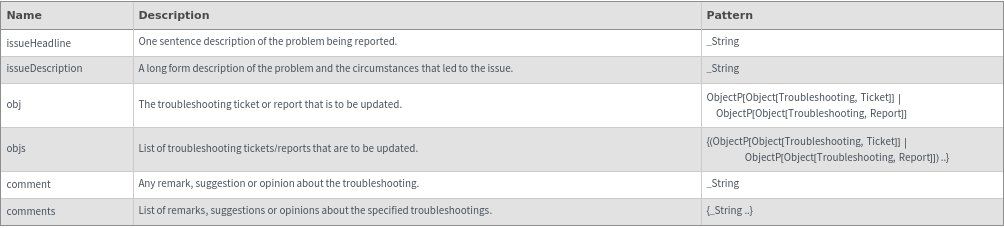
ReportTroubleshooting[Ticket|Report,issueHeadline,issueDescription ]obj

generates a troubleshooting obj to track a problem in the ECL.

ReportTroubleshooting[obj, comment]obj

updates a troubleshooting obj with the specified comment, as well as any options specified.

ReportTroubleshooting[obj]obj

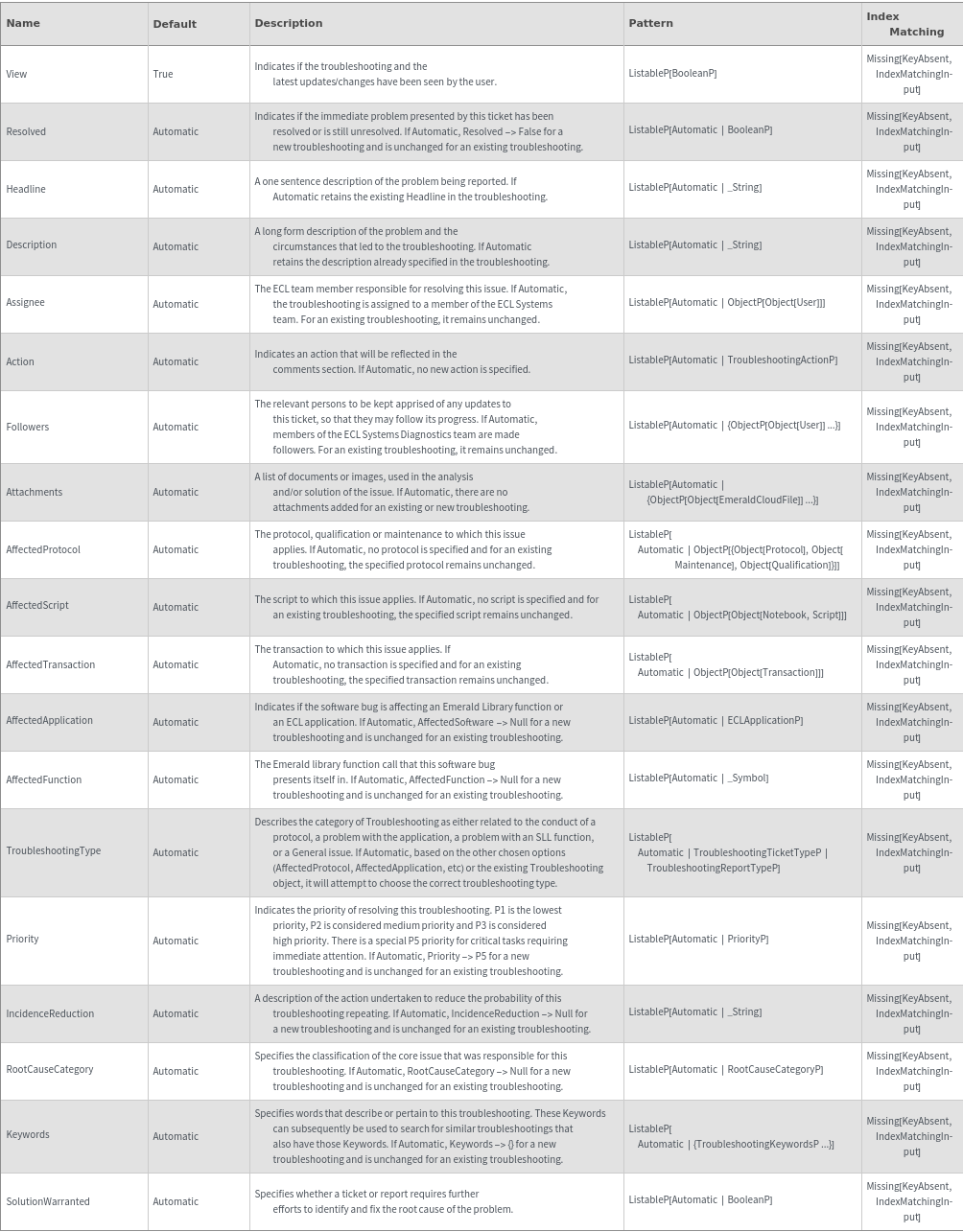
updates a troubleshooting obj according to any options that are specified.

ReportTroubleshooting[{{Ticket|Report,issueHeadline,issueDescription}..}]objs

generates multiple troubleshooting objs to track different problems in the ECL.

ReportTroubleshooting[objs, comments]objs

updates multiple troubleshooting objs with the specified comments, as well as any options specified.

ReportTroubleshooting[objs]objs

updates multiple troubleshooting objs according to any options that are specified.

Details

  • Note many options are map-threaded and can be individually specified when editing multiple troubleshootings.
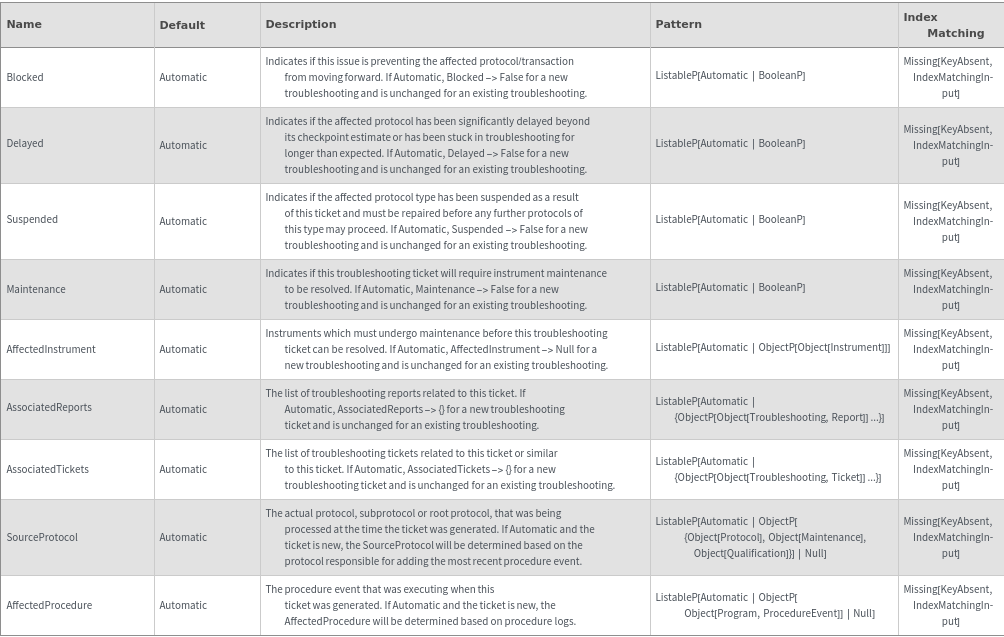
  • If Blocked -> True, any AffectedProtocol that is Processing is changed to status Troubleshooting.
  • If Blocked -> False, any AffectedProtocol that is in Troubleshooting is changed to status Processing.
  • If Suspended, Maintenance or Blocked -> True, then Resolved is automatically set to False.
  • Input
    Output
    General Options
    Report Options

    Ticket Options
    Messages
  • InputArgumentsMustBeOfEqualLengthThe length of supplied objects and comments must be equal. Please correct your arguments and try again.
    InputOptionLengthInvalidMapThread options must be of length equal to input arguments or of length 1. See '`1`'.
    InvalidOptionsResolved cannot be set to True if you are also setting Maintenance, Suspended or Blocked to True.
    InvalidUploadPacket'`1`' is not a valid upload packet.
    MessageLengthThe `1` can be no longer than `2` bytes. If the entire value is needed please include it as an attachment.
    NotebookOptionRequiredPlease specify a Notebook, AffectedProtocol or AffectedScript option.
    OptionConflictWithInputThe option(s): '`1`' conflict with '`2`'. Disregarding option(s).
    ResolvedOptionErrorResolved cannot be set to True if the Troubleshooting Ticket has Maintenance, Suspended or Blocked set to True.

Examples

Basic Examples  (6)

Comment on a troubleshooting ticket:

Create a troubleshooting Report:

Create a troubleshooting Report on a Script:

Create a troubleshooting Report on a Transaction:

Create a troubleshooting Ticket:

Create a troubleshooting ticket about an instrument in the lab:

Additional Examples  (4)

Comment on a troubleshooting report, add an attachment and set Resolved as False:

Create multiple troubleshootings at the same time:

Edit multiple troubleshootings at the same time:

Modify a troubleshooting ticket via Options:

Options  (36)

Action  (1)

Query about the status of a troubleshooting:

AffectedApplication  (1)

Specify the affected ECL application:

AffectedFunction  (1)

Specify the Emerald library function call that this software bug presents itself in:

AffectedInstrument  (1)

Specify an affected Instrument:

AffectedProcedure  (1)

Specify or clear the procedure event that may have instigated the ticket:

AffectedProtocol  (1)

Specify the protocol, qualification or maintenance to which this troubleshooting applies:

AffectedScript  (1)

Specify the script to which this troubleshooting Report applies:

AffectedSubprotocol  (1)

Specify or clear the subprotocol that was running when the ticket was created:

AffectedTransaction  (1)

Specify the transaction to which this troubleshooting Report applies:

Assignee  (1)

Indicate the ECL team member who will resolve this issue:

AssociatedReports  (1)

Specify a list of troubleshootings reports related to each Ticket:

AssociatedTickets  (1)

Specify a list of troubleshootings tickets related to each Ticket:

Attachments  (1)

Attach document(s) or image(s) that describe the problem:

Blocked  (1)

Indicate if this troubleshooting is preventing the affected protocol from moving forward:

Delayed  (1)

Indicate if the affected protocol has been significantly delayed beyond its checkpoint estimate:

Description  (1)

Update the long form description of the problem and the circumstances that led to the troubleshooting:

Email  (1)

Send an email notification when commenting on a troubleshooting ticket:

Followers  (1)

Specify the relevant persons to be apprised of any updates to this issue:

Headline  (1)

Update the one sentence description of the problem being reported:

IncidenceReduction  (1)

Update the description of action taken to reduce the probability of this troubleshooting from repeating.:

Keywords  (1)

Add a keyword to a troubleshooting:

Maintenance  (1)

Indicate if this troubleshooting ticket will require instrument maintenance for it to be resolved:

Priority  (1)

Indicate the priority of this troubleshooting:

Refund  (1)

Indicate if the user should be refunded:

Resolved  (1)

Indicate if the immediate problem presented by the troubleshooting ticket has been resolved:

RootCauseCategory  (1)

Update the classification of the core issue that was responsible for this troubleshooting:

SolutionWarranted  (5)

If the SolutionWarranted option is not specified when creating a new troubleshooting object, the SolutionWarranted and SolutionWarrantedLog fields are left Null/empty:

Mark that further solution is required to find and fix the root cause of a new troubleshooting:

Mark that further solution is required to find and fix the root cause of an existing troubleshooting:


Specifying the SolutionWarranted option when updating an existing troubleshooting object overwrites the SolutionWarranted field and appends to the SolutionWarrantedLog field:


Update SolutionWarranted for multiple troubleshooting objects at once:

Suspended  (1)

Indicate if the affected protocol type has been suspended as a result of this ticket and must be repaired before any further protocols of this type may proceed:

TaggedTickets  (1)

Specify a list of troubleshootings tickets to related to this report:

TroubleshootingType  (1)

Specify the type of problem the ticket is related to:

Upload  (1)

Upload the troubleshooting Report:

View  (1)

Indicates if the troubleshooting has been viewed in Athena:

Messages  (10)

InputArgumentsMustBeOfEqualLength  (1)

The number of comments should match the number of troubleshootings being edited:

InputOptionLengthInvalid  (1)

The length of mapthreaded options should be of length 1 or of a length that is equal to the number of troubleshootings:

InvalidOptions  (1)

Resolved cannot be set to True if you are also setting Maintenance, Suspended or Blocked to True:

InvalidUploadPacket  (1)

The function must return a valid packet that can be uploaded to the databse:

MessageLength  (3)

Print a message and returns $Failed if the comment is crazy long as this will break Nexana since character limits are enforced by Asana:


Print a message and returns $Failed if the Description is crazy long as this will break Nexana since character limits are enforced by Asana:

Print a message and returns $Failed if the Headline is crazy long as this will break Nexana since character limits are enforced by Asana:


NotebookOptionRequired  (1)

Raise error is AffectedProtocol or Notebook are not specified:

OptionConflictWithInput  (1)

The requested options' category must match the input object:

ResolvedOptionError  (1)

Resolved cannot be set to True if the Troubleshooting Ticket has Maintenance, Suspended or Blocked set to True:

Last modified on Mon 25 Jul 2022 12:27:14