
Search
Search[types]⟹objects
returns all objects of the given types.
Search[types, conditions]⟹objects
returns objects of the given types which satisfy the specified conditions.
Search[typesList]⟹objectsLists
returns a list of all the objects for each list of types in typesList.
Search[typesList, conditionsList]⟹objects
returns a list of objects for each set of types/condition pair.
Details
- The conditions given to Search must be a boolean logical expression constructed using field names and various conditional operators (such as '&&', '||') and comparison operators (such as '!=', '==', '>', '<', '>=', '<=').
- When using the Alternatives syntax `|` in Search, parentheses must enclose the Alternatives. For example, Status==(InUse|Available).
- By default, if the DeveloperObject field is not specified as a condition, Search will only return objects which have DeveloperObject!=True.
- When lists of types or conditions are specified, the lengths of the lists must match.
-
HoldRest -
Alternatives When using Alternatives in an equality it must be wrapped in parentheses. For example, Field==(AB). AmbiguousType Unable to search using the value `1` due to an ambiguity in the resulting field class after searching through links. CloudFileField The fields `1` in types `2` cannot be searched because searching on EmeraldCloudFiles is not currently supported. Please try restructuring your search to use different fields. ComputableField The fields `1` in types `2` cannot be searched on because they are live computed and not stored. Please try restructuring your search to use different fields. Error `1` InvalidField The fields `1` in types `2` are not valid fields for searching. InvalidSearchQuery The query does not have a valid form. Please check that your search conditions are only field names and expressions such as &&, , , ==, !=, <, >, <=, >=, Field, and Part. InvalidSearchValues The query has the follow invalid values in its conditions: `1`. MapThread The provided lengths of types `1` and queries `2` are unequal. MissingField The fields `1` in types `2` do not exist. MissingType The following types do not exist: `1`. NotebooksLength The provided lengths of types `1` and Notebooks `2` are unequal. Please update your request and try again. OptionLength The length of option `1` (`2`) does not match the length of the inputs (`3`). PublicObjectsLength The provided lengths of types `1` and PublicObjects `2` are unequal. Please update your request and try again.
Input

Output

General Options
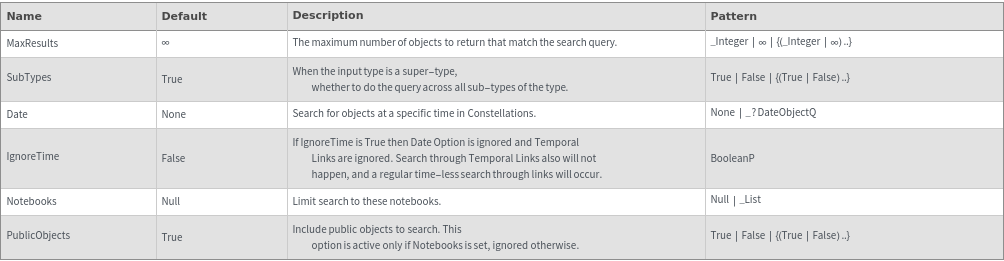
Attributes
Messages
Examples
Basic Examples (5)










Additional Examples (54)
Searching a super-type searches across all its sub-types :


Searching for an empty list of types returns an empty list:


Search with comparison and conditional operators like equality and greater than:


Apply multiple search criteria to the same field:


Search for objects that are linked to a specific object as given by ID:


Search for objects that are linked to a specific object as given by Name:

Search respects timeless objects. (The original value at historical time was 1 degree Celsius):


Search respects timeless object through links. (The original value at historical time was 1 degree Celsius):

Alternatives (2)


Any/All/Exactly (5)
Multiple fields can be searched using the Any syntax. In the following example, stock solutions will be returned which are incompatible with CarbonSteel:

Multiple fields can be searched using the Any syntax. In the following example, stock solutions will be returned which have a component under 1 Micromolar:

Multiple fields can be searched using the Exactly syntax. In the following example, stock solutions with this exact set of Incompatible Materials (with the order taken into account):

Multiple fields can be searched using the All syntax. In the following example, samples will be returned whose incompatible materials are all Polyurethane:

Any syntax can be used to search on indexed multiple fields:

Field (3)
Fields can be held with the Field head to prevent early evaluation when using Length. (This is useful when the field is passed as a variable to Search.):


Fields can be held with the Field head to prevent early evaluation when using Part. (This is useful when the field is passed as a variable to Search.):


The Field head can be used in a subset of search conditions:


Length (3)





MapThread (4)












Operations on Multiple Fields (5)
Search on specific indexes of an indexed multiple field:


Search on specific named indexes of a named multiple field:


Search on specific indexes of a named multiple field:

Search through links on specific indexes of an indexed multiple field:


Search through links on specific indexes of a named multiple field:


Operators (16)
Use '==' (equal) in the search conditions:


Usage of '===' is equivalent to '==':

Usage of 'Equal' is equivalent to '==':

Use '!=' (unequal) in the search conditions:


Use '>' (greater than) in the search conditions:


Usage of 'Greater' is equivalent to '>':

Use '<' (less than) in the search conditions:


Usage of 'Less' is equivalent to '<':
Use '>=' (greater or equal to) in the search conditions:


Usage of 'GreaterEqual' is equivalent to '>=':

Use '<=' (less or equal to) in the search conditions:

Usage of 'LessEqual' is equivalent to '<=':

Use '&&' (and) in the search conditions:


Usage of 'And' is equivalent to '&&':

Use '||' (or) in the search conditions:


Usage of 'Or' is equivalent to '||':

Strings (4)
Search for objects where a string field starts with a specific string (by default, is case sensitive):


Search for objects where a string field starts with a specific string (case insensitive):


Search for objects where a string field contains a specific string:

Search for objects where a string field ends with a specific string:




















































