
ecl-logo Documentation
ECL`

ShipToECL

ShipToECL[Model, ContainerLabel]Transaction

send samples and items to ECL. After generating your transaction, you will be able to print ID stickers to label the items and sample containers.

ShipToECL[Transaction]UpdatedTransaction

update an existing Transaction to add shipping information (such as tracking number, shipper, date shipped, and expected delivery date).

Details

  • Samples destined for ECL-2 (Austin, TX) should be addressed as follows:     c/o SAMPLES     Emerald Cloud Lab     Customer Receiving     15404 Long Vista Drive     Austin, TX 78728 The following phone number may be added for the recipient contact information: 512-226-3002.
  • Input
    Output
    Container Information Options
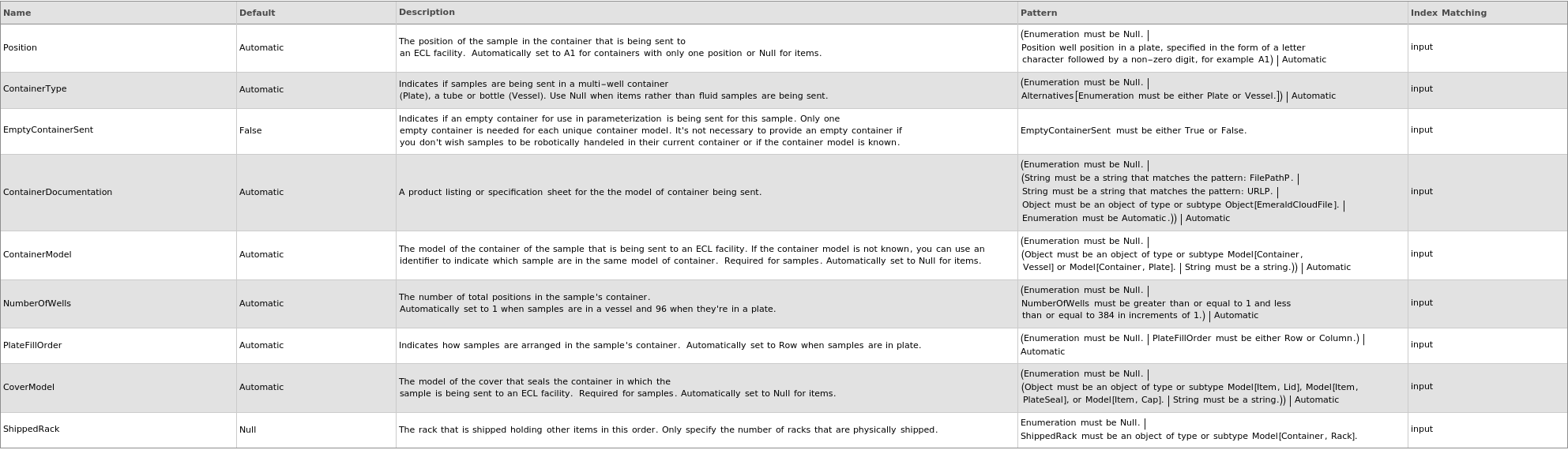
    Organizational Information Options

    Sample Properties Options

    Sample Storage Options

    Shipping Information Options

    General Options

Examples

open allclose all

Example Setup

These expressions are used in the examples to follow:

Basic Examples  (3)

Generate a transaction to ship samples to ECL:

Update shipping info for transaction objects:

When given an empty list, returns an empty list:

Additional Examples  (25)

Generate Transactions  (22)

Accepts listed input (items):

Accepts listed input (samples in plates):

Accepts listed input (samples in vessels):

Accepts semi-listed input:

Accepts semi-listed input (items):

Accepts semi-listed input (samples in vessels):

Accepts single input (1 sample in a plate):

Accepts single input (1 sample in a vessel):

Accepts single input (item):

A new sample is generated for each input:

If model containers are specified, new containers are made with the specified names and samples are put into the correct containers:

If position is not specified for a single-position container, the single position of the container will be used:

If the different container names are specified,the samples will be put into different containers:

If the same container name and model are specified, the samples will be put into the same container:

If the same container name and model is used for a plate, samples will be put into the same plate:

Items inherit the source site as their container:

Samples have the specified positions:

The logged in user is specified as the Creator of the Transaction object:

The samples and input containers get the status Transit:

The samples get the destination:

The source of the new samples (and any new containers) is the transaction object created to track their shipment:

The transaction status is updated by the currently logged in user when creating a transaction:

Update Transactions  (3)

The transaction status is updated by the currently logged in user when updating a transaction with a DateShipped:

The transaction status is updated by the currently logged in user when updating a transaction without a DateShipped:

Update shipping info for a single transaction object:

Options  (74)

ContainerDocumentation  (3)

Give the product URL for the container holding your samples:

Point to a file path containing information about the sample container:

Provide a cloud file containing documentation about the container model:

ContainerModel  (1)

ContainerModel may be specified for some inputs and not others:

ContainerOut  (2)

Specify that all samples should be transferred to a different container upon arrival:

Specify that some samples should be transferred to a different container upon arrival:

Count  (4)

If mass is provided and tablet weight is known, the count is calculated (rounding to the nearest whole number):

Specify a count for some but not all of the samples:

Specify a different count for each sample:

Specify the same count for all the samples:

CoverModel  (4)

CoverModel can be specified as Null in cases where the container is self covering:

CoverModel may be specified for some inputs and not others:

CoverModel will be automatically resolved to a placeholder model:

CoverModel will correctly resolve to Null in cases where the ContainerModel is self covering:

DateShipped  (6)

Specify a date shipped for each object when generating a transaction. Samples different with dates shipped are put into separate transactions:

Specify a date shipped for each object when updating shipping information:

Specify a date shipped for some but not all of the objects when generating a transaction. If DateShipped is specified, Status is Shipped; otherwise, Status is Pending:

Specify a date shipped when generating a transaction:

Specify a date shipped when updating shipping information:

When updating shipping information, Automatic DateShipped will leave the existing date shipped in place:

Destination  (1)

Specify the destination where the samples will be sent:

EmptyContainerSent  (2)

If two samples in vessels are sent assumes there are two distinct empty container models:

Indicate if an empty container is provided for parameterization:

ExpectedDeliveryDate  (7)

Specify an expected delivery date for each object when generating a transaction. Samples with different dates shipped are put into separate transactions:

Specify an expected delivery date for each object when updating shipping information:

Specify an expected delivery date for some but not all of the objects when generating a transaction.:

Specify an expected delivery date for some but not all of the objects when updating shipping information:

Specify an expected delivery date when generating a transaction:

Specify an expected delivery date when updating shipping information:

When updating shipping information, Automatic ExpectedDeliveryDate will leave the existing date expected in place:

Mass  (5)

If count is provided and tablet weight is known, the mass is calculated:

If volume is provided and density is known, the mass is calculated:

Specify a different mass for each sample:

Specify a mass for some but not all of the samples:

Specify the same mass for all the samples:

Name  (3)

If multiple transactions are generated, an index is appended to the name:

Name the transaction being created:

Update the name of existing transactions:

NumberOfUses  (3)

Specify a different NumberOfUses for each sample:

Specify a NumberOfUses for some but not all of the samples:

Specify the same NumberOfUses for all the samples:

NumberOfWells  (1)

Indicate the number of wells in the plate. This is then used to resolve the positions of the specified samples:

PlateFillOrder  (1)

Indicate that the list of samples fill the plate column-by-column (as opposed to row-by-row):

Position  (1)

Position may be specified for some inputs and not others:

Product  (3)

Specify a different Product for each sample:

Specify a Product for some but not all of the samples:

Specify the same Product for all the samples:

ReceivingTolerance  (1)

Specify the allowable difference between received amount and expected amount for any ordered samples:

ShippedRack  (2)

A rack object is created for every ShippedRack:

Populate ShippedRack when the shipment includes a rack to hold the other shipped items:

Shipper  (7)

Specify a shipper for each object when generating a transaction. Samples with different dates shipped are put into separate transactions. (TrackingNumber and Shipper must be provided together.):

Specify a shipper for each object when updating shipping information:

Specify a shipper for some but not all of the objects when generating a transaction. (TrackingNumber and Shipper must be provided together.):

Specify a shipper for some but not all of the objects when updating shipping information:

Specify a shipper when generating a transaction. (TrackingNumber and Shipper must be provided together.):

Specify a shipper when updating shipping information:

When updating shipping information, Automatic Shipper will leave the existing Shipper in place:

Source  (2)

If not specified, the source of the Transaction object is pulled from the site of the financer of the notebook where the function is called from:

Specify the site where the samples are being shipped from:

StorageCondition  (4)

If StorageCondition is not specified, the new samples inherit the DefaultStorageCondition of the model:

Specify a StorageCondition for each sample:

Specify a StorageCondition some samples, and let other samples default from the model:

Specify StorageCondition to be the same for all samples:

TrackingNumber  (7)

Specify a tracking number for each object when generating a transaction. Samples with different dates shipped are put into separate transactions. (Shipper must be provided along with tracking number):

Specify a tracking number for each object when updating shipping information. (Shipper must also be provided, or must already be populated in the transaction object):

Specify a tracking number for some but not all of the objects when generating a transaction. (TrackingNumber and Shipper must be provided together.):

Specify a tracking number for some but not all of the objects when updating shipping information. (Shipper must also be provided, or must already be populated in the transaction object):

Specify a tracking number when generating a transaction. (Shipper must be provided along with tracking number):

Specify a tracking number when updating shipping information. (Shipper must also be provided, or must already be populated in the transaction object):

When updating shipping information, Automatic TrackingNumber will leave the existing tracking number in place:


Volume  (4)

If mass is provided and density is known, the volume is calculated:

Specify a different volume for each sample:

Specify a volume for some but not all of the samples:

Specify the same volume for all the samples:

Messages  (46)

AmountNotRequired  (1)

If Volume or Mass are specified for any items, a message is thrown and the amount is disregarded for those items:

AmountWillBeMeasured  (1)

If mass or volume is not specified for samples, a message is given indicating that the amount will be measured upon arrival:

ConflictingContainerDocumentation  (1)

Distinct container documentation must provided for container models with unique properties such as type or number of wells:

ContainerDocumentationFiles  (1)

If specifying a local file containing the container documentation, that file must exist:

ContainerInformationNotRequired  (3)

Cover cannot be specified for Item inputs:

If ContainerModel is specified for an item, give a message and fail:

None of the container options should be specified when items are being sent:

ContainerInformationRequired  (1)

None of the container options should be set to Null when samples are being provided:

ContainerModelTypeMismatch  (1)

If ContainerModel and ContainerType are both specified they must indicate the same type of container:

ContainerOutNotRequired  (1)

If ContainerOut is specified for an item, give a message and fail:

ContainerOutNotValidated  (1)

Give a warning if it cannot be determined whether the specified container out is large enough to hold the sample:

ContainersMayNotSpanShipments  (2)

When generating transaction objects, if different shipping info is specified for the same container, give a message and return $Failed:

When generating transaction objects, if different shipping info is specified for the same container, give a message and return $Failed:

ContainerSpecificationConflict  (1)

Gives a message and returns $Failed if different plate models are given for the same plate according to the provided label:

ContainerTransferForRoboticUse  (1)

When using a plate without a known model, an empty container is recommended for parameterization so that the plate can be used in robotic transfers without moving samples:

CountNotRequired  (1)

If count is provided but the sample is not a tablet, throws an error:

EmptyContainerUnneeded  (1)

Sending empty containers for already verified models throws a warning that the empty container is not needed:

IncompatibleCoverModel  (1)

Cover must not be specified for all Sample inputs in self covering containers:

IncompatibleCoverModelType  (1)

CoverModel and ContainerModel must be compatible with eachother:

InputLengthMismatch  (2)

If a listed option does not match the length of the inputs, give a message and return $Failed:

If a listed option does not match the length of the transaction object inputs, give a message and return $Failed:

InsufficientContainerSpace  (1)

By definition vessels only have one well, so unique names must be given for each sample when vessels are being shipped:

InvalidDates  (2)

If DateShipped is after ExpectedDeliveryDate when generating transactions, give a message and return $Failed:

If DateShipped is after ExpectedDeliveryDate when updating transactions, give a message and return $Failed:

InvalidPosition  (1)

Errors if a position is specified that doesn't exist in the container model:

NameInUse  (2)

If a name is already in use, give a message and fail:

If a name is already in use, give a message and fail:

NoCompatibleRack  (1)

If there is no Model[Container, Rack] in the database that can hold the ContainerModel upright based on its Footprint and dimensions, return an error:

NoNotebook  (1)

Gives a message and returns $Failed if not called from a notebook:

NonstandardWellNumber  (1)

The NumberOfWells option should only be used when samples are in a plate:

NoPlateFillOrder  (1)

Samples in vessels should not have PlateFillOrder set as it is specific only to plates:

NumberOfUsesNotRequired  (1)

NumberOfUses may not be specified for non-column samples:

NumberOfWellsMismatch  (1)

Print a message and returns $Failed if the NumberOfWells options conflicts with the value in the container model:

PlateOptionsRequired  (1)

None of the plate-specifc options should be set to Null when a plate of samples is sent:

PositionNotRequired  (1)

If Position is specified for an item, give a message and fail:

ReusedPosition  (2)

If two inputs point to the same location, return $Failed:

Two inputs may point to the same position in different plates:

ShippingOptionRequired  (1)

Product must be specified for {Object[Item,Column],Object[Item,Gel],Object[Sample],Object[Item,Consumable],Object[Item,Cap],Object[Item,Tips]} samples:

ShipToECLDuplicateName  (2)

Gives a message and returns $Failed if any of the input names are used more than once for the same item type:

Gives a message and returns $Failed if any of the input names are used more than once for the same vessel model:

TrackingNumberAndShipperRequiredTogether  (2)

TrackingNumber and Shipper must be provided together when generating a transaction:

TrackingNumber and Shipper must be provided together when updating a transaction:

UnneededContainerDocumentation  (1)

ContainerDocumentation is intended to be used to create new container models and should not be provided when a container model is specified:

VolumeExceedsContainerOut  (1)

If ContainerOut is too small to hold the sample volume, give a message and fail:

Name  (2)

If the name is already in use, throws an error and fails:

If the name is already in use, throws an error and fails:

Last modified on Thu 25 Sep 2025 16:15:51


































































