
UploadCountLiquidParticlesMethod
UploadCountLiquidParticlesMethod[Samples]⟹CapillaryELISACartridgeModel
creates a new pre-loaded CapillaryELISACartridgeModel with the specified analytes, cartridge type and species.
Details
Input

Output

Particle Size Measurements Options
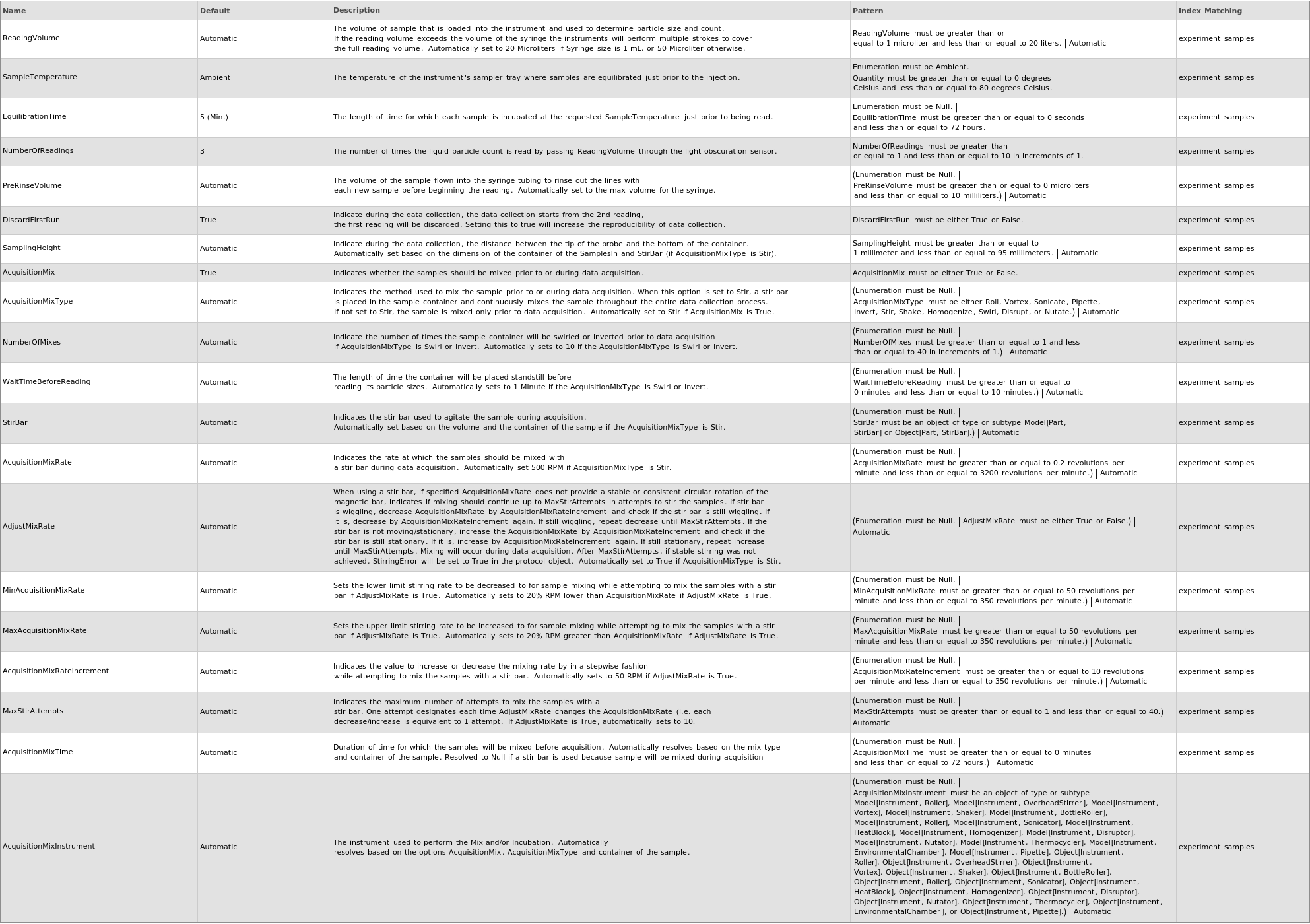
Sample Preparation Options
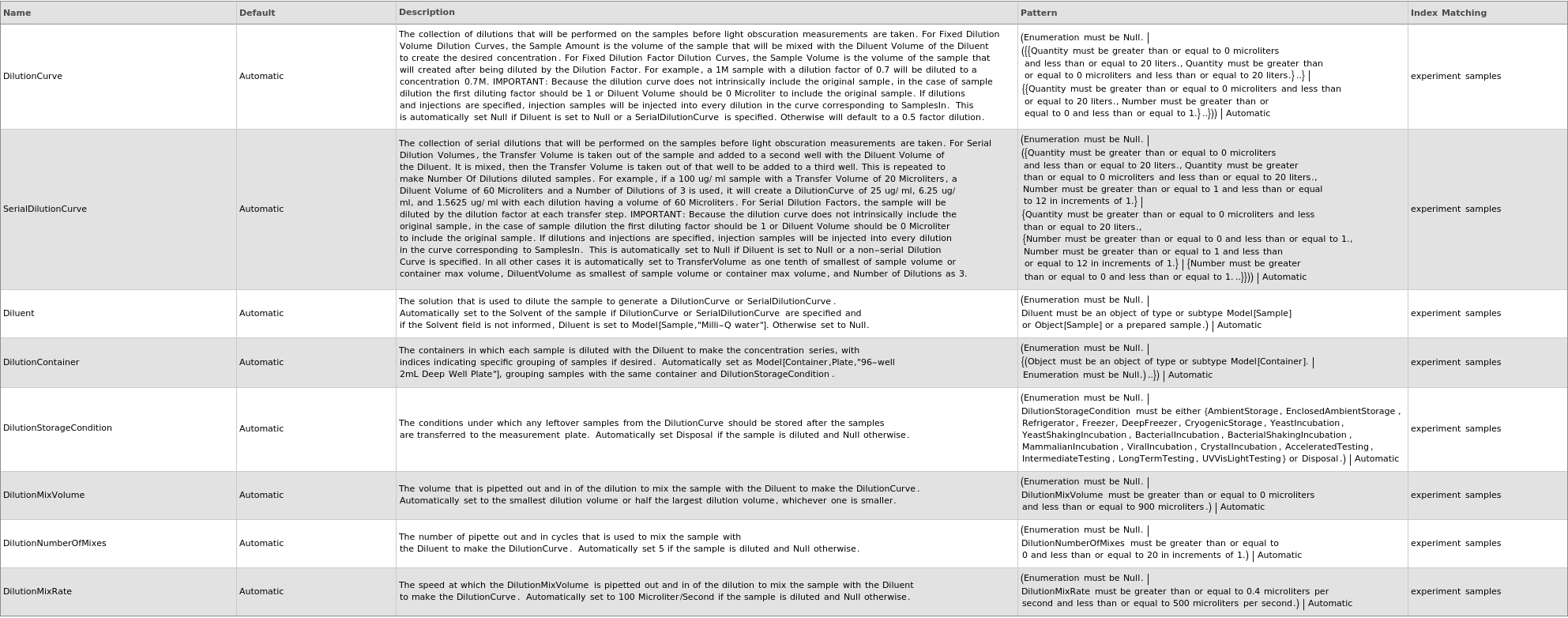
Washing Options

General Options

Examples
open allclose allOptions (37)
AcquisitionMix (1)
AcquisitionMixRate (1)
AcquisitionMixRateIncrement (1)
AdjustMixRate (1)
Specify When using a stir bar, if specified AcquisitionMixRate does not provide a stable or consistent circular rotation of the magnetic bar, indicates if mixing should continue up to MaxStirAttempts in attempts to stir the samples. If stir bar is wiggling, decrease AcquisitionMixRate by AcquisitionMixRateIncrement and check if the stir bar is still wiggling. If it is, decrease by AcquisitionMixRateIncrement again. If still wiggling, repeat decrease until MaxStirAttempts. If the stir bar is not moving/stationary, increase the AcquisitionMixRate by AcquisitionMixRateIncrement and check if the stir bar is still stationary. If it is, increase by AcquisitionMixRateIncrement again. If still stationary, repeat increase until MaxStirAttempts. Mixing will occur during data acquisition. After MaxStirAttempts, if stable stirring was not achieved, StirringError will be set to True in the methods object:
Cache (1)
Diluent (1)
DilutionContainer (1)
DilutionCurve (1)
Specify the collection of dilutions that will be performed on the samples before light obscuration measurements are taken. For Fixed Dilution Volume Dilution Curves, the Sample Amount is the volume of the sample that will be mixed with the Diluent Volume of the Diluent to create the desired concentration. For Fixed Dilution Factor Dilution Curves, the Sample Volume is the volume of the sample that will created after being diluted by the Dilution Factor. For example, a 1M sample with a dilution factor of 0.7 will be diluted to a concentration 0.7M. IMPORTANT: Because the dilution curve does not intrinsically include the original sample, in the case of sample dilution the first diluting factor should be 1 or Diluent Volume should be 0 Microliter to include the original sample. If dilutions and injections are specified, injection samples will be injected into every dilution in the curve corresponding to SamplesIn:
DilutionMixRate (1)
DilutionMixVolume (1)
DilutionNumberOfMixes (1)
DilutionStorageCondition (1)
DiscardFirstRun (1)
EquilibrationTime (1)
MaxAcquisitionMixRate (1)
MaxStirAttempts (1)
MinAcquisitionMixRate (1)
NumberOfReading (1)
NumberOfWash (1)
ParticleSizes (1)
PreRinseVolume (1)
ReadingVolume (1)
SampleTemperature (1)
SerialDilutionCurve (1)
Specify the collection of serial dilutions that will be performed on the samples before light obscuration measurements are taken. For Serial Dilution Volumes, the Transfer Volume is taken out of the sample and added to a second well with the Diluent Volume of the Diluent. It is mixed, then the Transfer Volume is taken out of that well to be added to a third well. This is repeated to make Number Of Dilutions diluted samples. For example, if a 100 ug/ ml sample with a Transfer Volume of 20 Microliters, a Diluent Volume of 60 Microliters and a Number of Dilutions of 3 is used, it will create a DilutionCurve of 25 ug/ ml, 6.25 ug/ ml, and 1.5625 ug/ ml with each dilution having a volume of 60 Microliters. For Serial Dilution Factors, the sample will be diluted by the dilution factor at each transfer step. IMPORTANT: Because the dilution curve does not intrinsically include the original sample, in the case of sample dilution the first diluting factor should be 1 or Diluent Volume should be 0 Microliter to include the original sample. If dilutions and injections are specified, injection samples will be injected into every dilution in the curve corresponding to SamplesIn: