
ecl-logo Documentation

UploadQuizQuestion

UploadQuizQuestion[questions,answers]questionObjects

returns the questionObjects constructed from the questions and answers.

Details

    Input

    Output

    Answer Information Options
    Organizational Information Options

    Question Information Options

    Quiz Information Options

Examples

Basic Examples  (4)

Upload a new multiple choice quiz question, by providing PossibleResponses:

Upload a freeform quiz question:

Upload a new multiple choice quiz question with multiple possible correct answers:

Upload multiple questions:

Options  (14)

Boolean  (1)

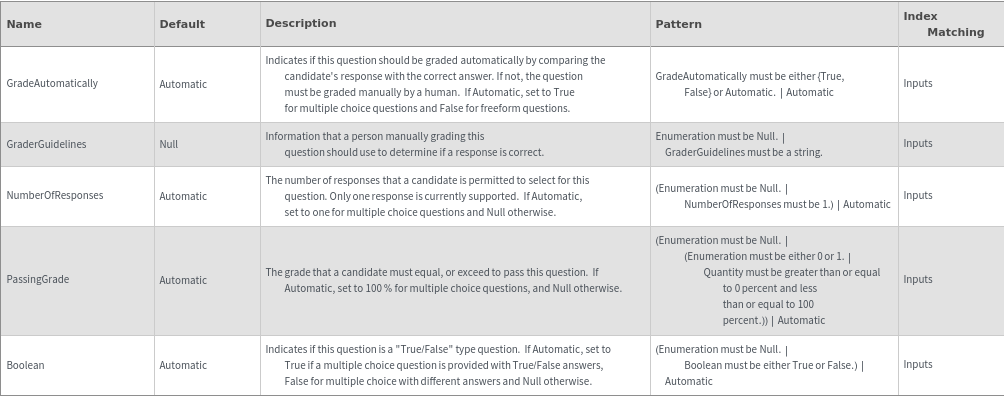
Use the Boolean option to set a question with Boolean possible responses:

Cache  (1)

Use the Cache option:

GradeAutomatically  (1)

Use the GradeAutomatically option to indicate if this question should be graded by the computer without human intervention:

GraderGuidelines  (1)

Use the GraderGuidelines option to provide guidance to the human grading this question:

InteractiveTrainingModels  (1)

Use the InteractiveTrainingModels option to link this question object to an existing interactive training object:

Name  (1)

Use the Name option to set the name of the question object:

NumberOfResponses  (1)

Use the NumberOfResponses option to set the number of responses that a user should provide to a multiple choice question, with multiple correct responses:

Output  (1)

Use the Output option to set the type of output:

PassingGrade  (1)

Use the PassingGrade option to set the minimum number of responses that a user must get correct for their overall response to this question to be considered a pass:

PossibleResponses  (1)

Use the PossibleResponses option to set the responses that a user may choose from for a multiple choice question:

Synonyms  (1)

Use the Synonyms option to set a list of alternative names for the question object:

Tags  (1)

Use the Tags option to set a list of descriptors for the question object:

TimeAllowed  (1)

Use the TimeAllowed option to set the time that a user is given to respond to the question:

Upload  (1)

Use the Upload option to set whether to upload the created question packets:

Messages  (7)

InputLengthMismatch  (1)

The number of provided questions must match the number of provided correct responses:

UploadQuizQuestionAnswerGradingConflict  (1)

If inapplicable grading options are provided, throw an error:

UploadQuizQuestionBooleanOptionConflict  (1)

If Boolean is set to True, the possible responses must be True/False:

UploadQuizQuestionNumberOfResponsesConflict  (1)

If the number of responses that a user should give is more than the number of correct answers, throw an error:

UploadQuizQuestionPassingGradeConflict  (1)

If the pass mark is not achievable, throw an error:

UploadQuizQuestionPossibleResponseConflict  (1)

If the correct answer cannot be provided by the user, throw an error:

UploadQuizQuestionSynonymMissing  (1)

If synonyms are provided, warn if they do not contain the name of the object:





















































