
UploadSite
UploadSite[team]⟹site
create a site that contains address information for team.
UploadSite[team,site]⟹site
edit an existing site for team.
Details
Input

Output

Organizational Information Options

General Options
Examples




Additional Examples (2)




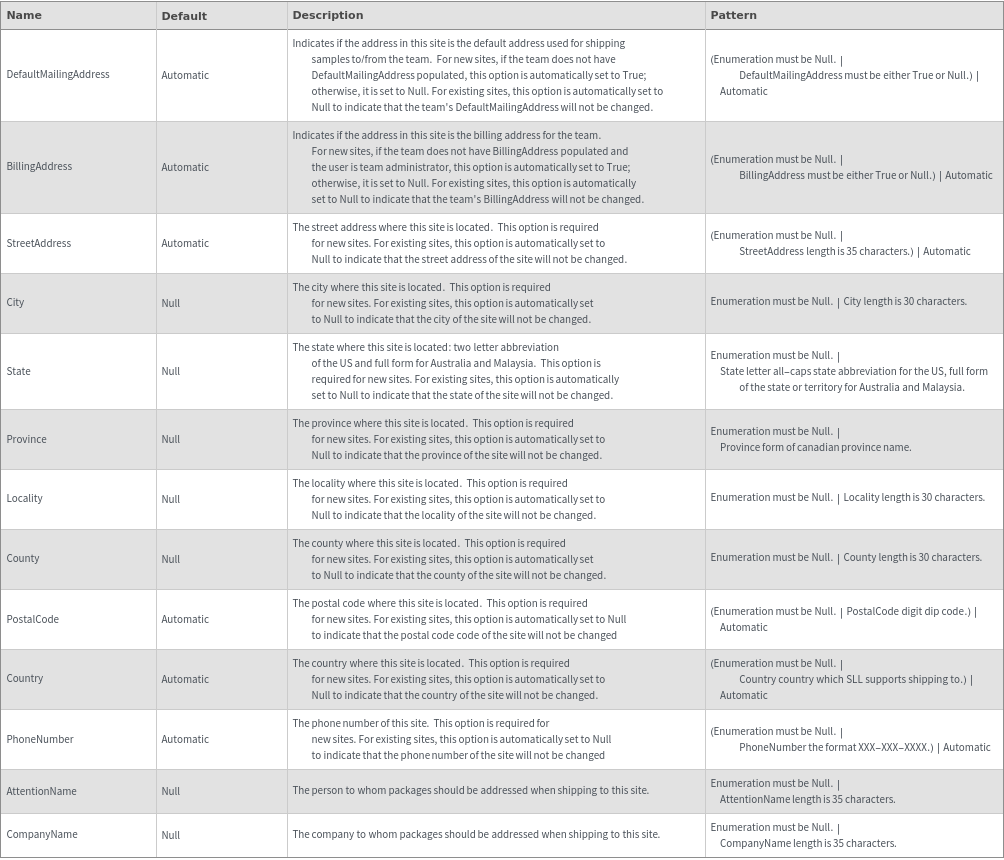
Options (27)
AttentionName (2)



BillingAddress (6)
Specify that this is the default address to use for billing. (This is only possible as a team administrator):


Create a site, but do not set it as default shipping address team:

If BillingAddress is not specified and the team already has a billing address, the default billing address will not change:


If BillingAddress is not specified and the team does not already have a billing address, the created site will be set as the default billing address if the user is a team administrator:


If BillingAddress is not specified and the team does not already have a billing address, the created site will not be set as the default billing address if the user is not a team administrator:

Change an existing address to be the billing address of the team:








DefaultMailingAddress (5)
Specify that this is the default address to use for shipping packages to/from the team:


Create a site, but do not set it as default shipping address team:

If DefaultMailingAddress is not specified and the team already has a default mailing address, the default mailing address will not change:

If DefaultMailingAddress is not specified and the team does not already have a default mailing address, the created site will be set as the default mailing address:


Change an existing address to be the default shipping address of the team:




































