
UploadStockSolution
UploadStockSolution[Components,Solvent,TotalVolume]⟹StockSolutionModel
creates a new StockSolutionModel for combining Components and using Solvent to fill to TotalVolume after initial component combination.
UploadStockSolution[Components]⟹StockSolutionModel
creates a new StockSolutionModel that is prepared by combining all samples as specified in the Components.
UploadStockSolution[TemplateStockSolution]⟹StockSolutionModel
creates a new StockSolutionModel using the formula from the TemplateStockSolution and drawing any preparation parameter defaults from the TemplateStockSolution.
UploadStockSolution[UnitOperations]⟹StockSolutionModel
creates a new StockSolutionModel that is prepared by following the specified UnitOperations.
Details
- If an existing stock solution model is found that matches all of the parameters specified for the new stock solution model, the existing model is returned in a simplified packet.
- However if a Name is explicitly provided, a new stock solution model will ALWAYS be uploaded.
- Stock solution models generated with this function may be then prepared via ExperimentStockSolution.
- ExperimentStockSolution also has an overload that directly calls this function.
- Components will be combined in the following order: 1.) All solids are combined first in the provided order 2.) All liquids will be added in the provided order, except for acids and bases 3.) (optional): Fill-to-volume additions will be made to the provided total volume 4.) All liquids that are acids and bases will be added
Input

Output

Autoclaving Options

Compatibility Options
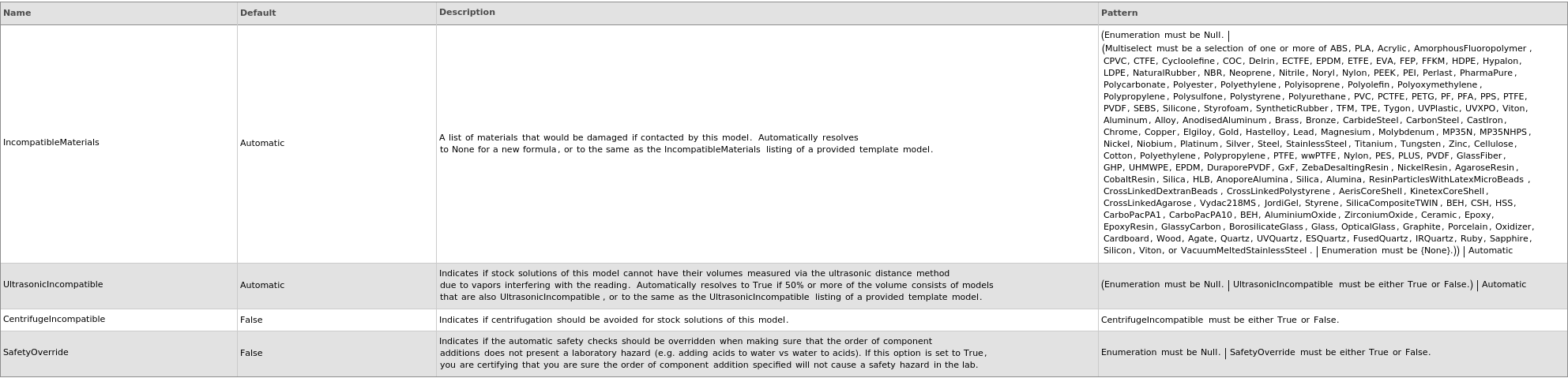
Filtration Options

Health & Safety Options

Incubation Options

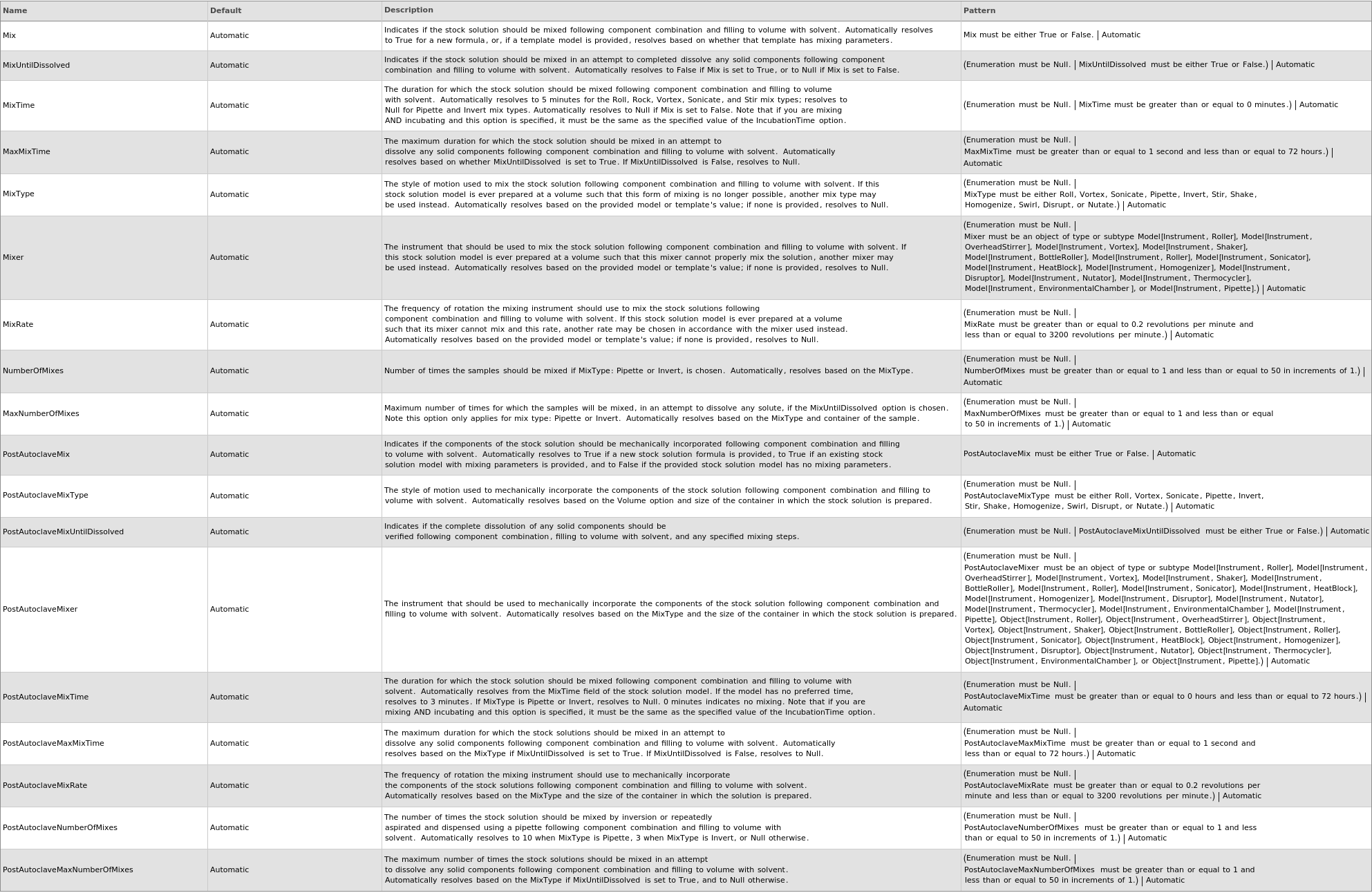
Mixing Options
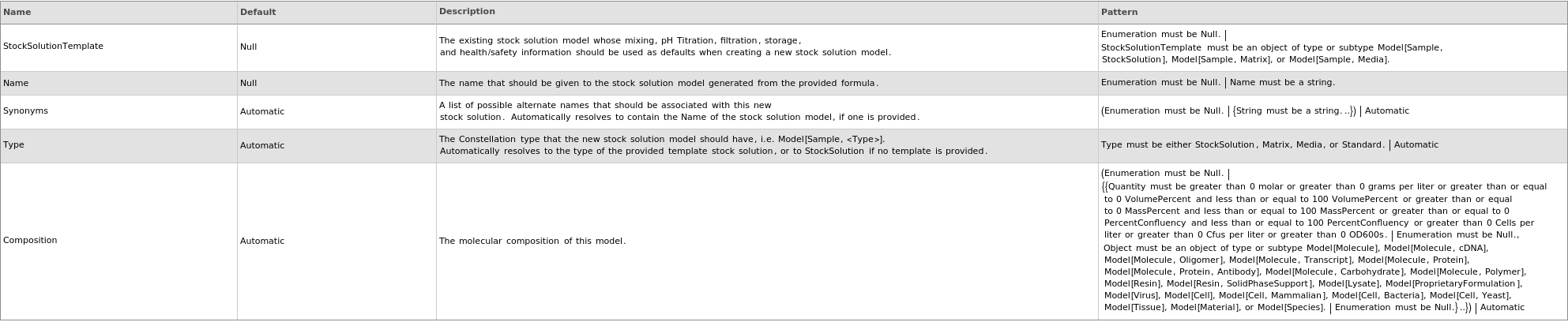
Organizational Information Options
pHing Limits Options

pH Titration Options

Physical Properties Options

Preparation Options
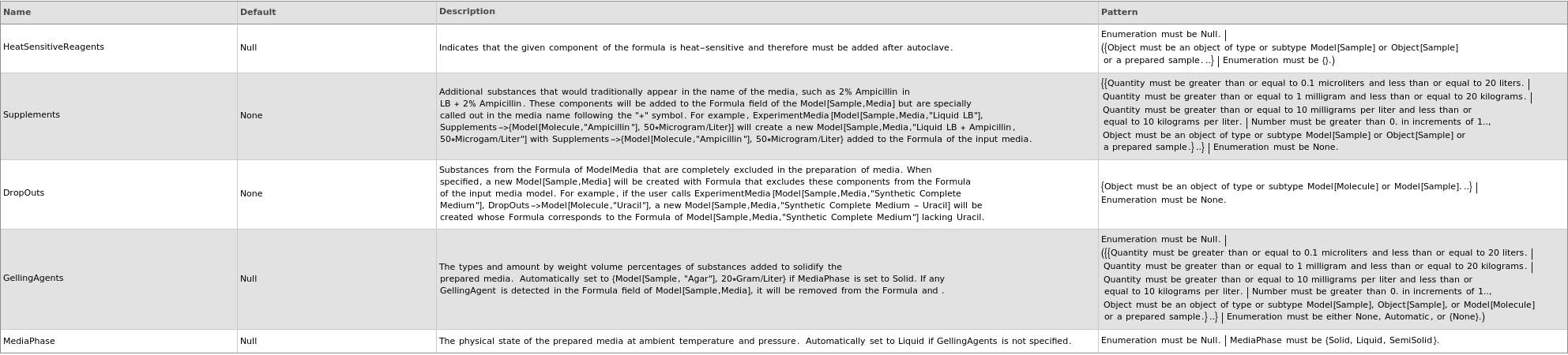
Preparation Information Options
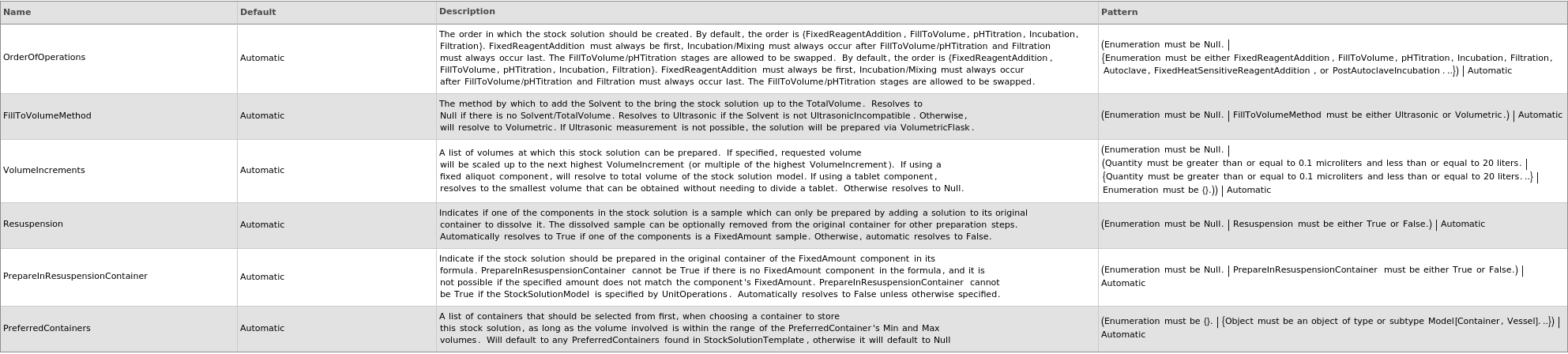
Storage Information Options
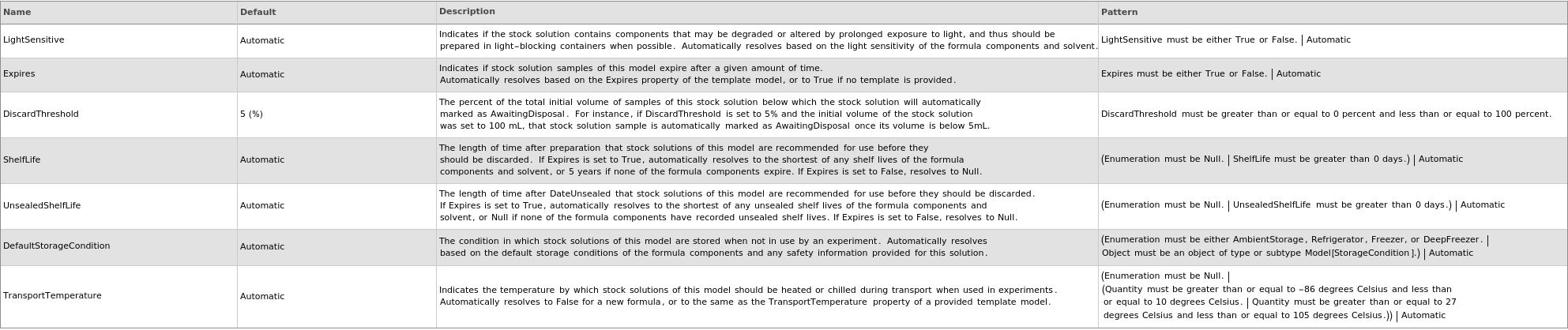
Examples
open allclose allBasic Examples (5)
Create a model for a 50% (v/v) methanol/water solution:
Create a model for a 50% (v/v) methanol/water solution:
Create a model for a salt solution filled to a total volume of 1L with deionized water:
Create a model for a solution of multiple solid components with a total volume of 1L:
Create a model for a stock solution based on unit operations:
Additional Examples (21)
A stock solution formula including a tablet component will not have a unit associated with the component amount:
A stock solution including a fixed-aliquot sample populates the VolumeIncrements field:
A stock solution including a fixed amounts sample has the Resuspension resolved to True automatically:
A stock solution including a tablet component will automatically be marked as only preparable in multiples that require equal or less than the lowest of all tablet counts:
Create a model for a solution in which a solid component is a tablet by specifying a particular count of tablets to be included in the mixture:
Create a model for a stock solution based on various unit operations:
Formula components may themselves be stock solutions:
If an existing stock solution model is found in Constellation that has the exact same formula components in the same ratios, as well as identical preparation parameters, that model is returned in lieu of generating a new model:
Liquid components can be specified with amounts that have units of mass:
Only the Formula field is populated for a stock solution with no specified solvent or fill-to volume:
Safety information of the stock solution is automatically resolved based on the formula components:
The Formula, FillToVolumeSolvent, and TotalVolume fields in the uploaded stock solution model are populated with the provided inputs for a fill-to-volume style solution:
The solvent of a solution may itself be a stock solution:
Formula Issues (7)
Formula components cannot be deprecated:


Formula components must be unique:


If no solvent is explicitly provided, the mixture of all solids will be a new stock solution with State->Solid:
Only solids and liquids are supported as formula components:


Tablet components must be specified in amounts that are tablet counts, not masses:


The solvent must be a liquid if explicitly provided:


The sum of the volumes of any formula components should not exceed the requested total volume of the solution:


Options (112)
Acid (2)




AdjustpH (1)
Base (2)
Composition (2)
DefaultStorageCondition (2)
Density (1)
DiscardThreshold (1)
Expires (3)
If Expires is set to False, ShelfLife/UnsealedShelfLife cannot also be set:


If the stock solution is stable and should never be automatically disposed, set Expires to False:
Indicate if stock solution samples of this model expire after a given amount of time (specifiable via the ShelfLife option). Expired samples may be subjected to automated disposal:
FillToVolumeMethod (1)
Filter (4)
Indicate if the stock solution should be filtered following component combination, filling to volume with solvent, mixing, and/or pH titration; the resulting stock solution model will have default filtration parameters assigned:
Indicate if the stock solution should NOT be filtered following component combination, filling to volume with solvent, mixing, and/or pH adjustment; the resulting stock solution model will not have any filtration parameters populated:
The total preparation volume of the stock solution must exceed a minimum threshold for filtration to ensure that a method with low enough dead volume is available:


This boolean option must be set to True in order to set specific filtration parameters:


FilterMaterial (1)
FilterSize (1)
Flammable (1)
Fuming (1)
IncompatibleMaterials (1)
Incubate (5)
Indicate if the stock solution should be incubated following component combination and filling to volume with solvent; if Mix->True and Incubate->True, will resolve to 30 Celsius:
Indicate if the stock solution should be incubated following component combination and filling to volume with solvent; if the resulting stock solution has Mix->False but Incubate->True, IncubationTime will be populated:
Indicate if the stock solution should be incubated following component combination and filling to volume with solvent; if the resulting stock solution is resolved to mix AND incubate, MixTime and IncubationTime will be populated with the same thing:
Indicate if the stock solution should NOT be incubated following component combination; the resulting stock solution model will have no incubation information:
Setting Incubate to False but specifying incubation parameters results in an error:


IncubationTemperature (1)
IncubationTime (1)
LightSensitive (2)
MaxMixTime (3)
An upper bound on mixing time should only be provided if mixing until dissolution with MixTime specified:


Set a maximum duration for which the stock solution should be mixed in an attempt to dissolve any solid components following component combination and filling to volume with solvent:
This maximum will resolve automatically if a mix time to start with is provided:
MaxNumberOfMixes (1)
MaxpH (3)


MinpH (3)
Mix (3)
Indicate if the stock solution should be mixed following component combination and filling to volume with solvent; the resulting stock solution model will have default mixing parameters assigned:
Indicate if the stock solution should NOT be mixed following component combination; the resulting stock solution model will have no mixing information:
Setting Mix to False but specifying mixing parameters results in an error:


Mixer (1)
MixRate (1)
MixTime (1)
MixUntilDissolved (1)
Name (2)


NominalpH (5)
If MinpH and MaxpH are specified, choose the mean between them to resolve NominalpH:
If pH titration is requested, the preparation volume of the provided stock solution formula must exceed the minimum threshold to ensure the smallest pH probe can fit in any container in which this formula can be combined:


Specify the pH to which this solution should be adjusted following component combination and mixing:
The MinpH, MaxpH, pHingAcid and pHingBase can be automatically resolved if a NominalpH is set:
The NominalpH, MinpH, and MaxpH options should be in appropriate numerical order:


pHingAcid (3)
pHingBase (3)
PostAutoclaveIncubate (1)
PostAutoclaveIncubationTemperature (1)
PostAutoclaveIncubationTime (1)
PostAutoclaveMaxMixTime (1)
PostAutoclaveMaxNumberOfMixes (1)
PostAutoclaveMixUntilDissolved (1)
PostAutoclaveNumberOfMixes (1)
PreferredContainers (1)
Preparable (2)
PrepareInResuspensionContainer (1)
Resuspension (1)
SafetyOverride (1)

ShelfLife (3)
Automatically resolves to 5 years if Expires is set to True and no formula components have shelf lives:
Automatically resolves to the shortest of the shelf lives of any formula components:
Specify the length of time after preparation (but without being used) that samples of this stock solution are recommended for use before they should be discarded:
StockSolutionTemplate (9)
A template may also be provided directly as an input; this template specification will use the Formula from the template solution as the new solution's formula:
Draw filtration defaults from an existing template, overriding the filter and material with new values:
Draw incubation defaults from an existing template, overriding the incubation parameters with new values:
If a provided template model is deprecated, it will not be used as a source of default option values:

If BOTH the template input and option are used, and the option differs from the input, the option will be ignored in favor of the direct input:

If the template is not specified but a model is provided, the Template option resolves to that model:
Provide a stock solution model from which to draw default options:
The type of the new stock solution matches the type of the input sample:

Use preparation defaults from an existing solution for a different formula:
Synonyms (1)
TransportTemperature (2)
Type (3)
UltrasonicIncompatible (4)
Automatically resolves to True if 50% or more of the volume consists of UltrasonicIncompatible chemicals:
Automatically resolves to True if 50% or more of the volume consists of UltrasonicIncompatible chemicals (including the solvent in FillToVolume solutions):
Override automatic resolution if specifying UltrasonicIncompatible manually:
Pass the UltrasonicIncompatible option down from the provided template:
UnsealedShelfLife (4)
Automatically resolves to match ShelfLife if Expires is set to True and no formula components have unsealed shelf lives:
Automatically resolves to the shortest of the unsealed shelf lives of any formula components:
A warning is provided if the provided UnsealedShelfLife is longer than the provided ShelfLife:

Specify the length of time after first use that samples of this stock solution are recommended for use before they should be discarded:
Ventilated (1)
Messages (61)
BelowFillToVolumeMinimum (2)

ComponentAmountOutOfRange (3)




ComponentOrder (7)
If in a fill-to-volume stock solution and using an acid, alter the formula to add some of the fill-to-volume solvent before adding the acid, and filling to the requested volume after:

If in a fill-to-volume stock solution and using an acid and there is another UsedAsSolvent liquid added before the acid to a sufficient amount, no warning is thrown and the input order is respected:
If in a fill-to-volume stock solution and using more than one acid, if at the addition of any acid and there is not sufficient UsedAsSolvent liquid added before for the combined acid volume, throw a warning and adjust the order:

If in a formula-only stock solution and using an acid and there is UsedAsSolvent liquid added before the acid to a sufficient amount, no warning is thrown and the input order is respected:
If in a formula-only stock solution and using more than one acid, if at the addition of any acid and there is not sufficient UsedAsSolvent liquid added before for the combined acid volume, and we are adding more liquid to it, throw a warning and adjust the order:

If in a formula-only stock solution and using more than one acid, if at the addition of any acid and there is not sufficient UsedAsSolvent liquid added before for the combined acid volume, but we are not adding more liquid to it, no warning is thrown and the input order is respected:
If the order of the components are such that liquid acids are added before other liquid components, throw a warning and change the order:

ComponentRequiresTabletCount (1)
ConflictingUnitOperationsOptions (1)


DeprecatedTemplate (3)


ExistingModelReplacesInput (1)

ExpirationShelfLifeConflict (1)
FilterOptionConflictUSS (1)
FormulaVolumeTooLarge (2)

IncubateOptionConflict (1)
InvalidFillToVolumeMethodNoSolvent (1)



InvalidLabelContainerUnitOperationInput (1)


InvalidOrderOfOperations (5)

InvalidPreparationInResuspensionContainer (1)


InvalidResuspensionAmounts (1)

InvalidResuspensionOption (1)


InvalidUltrasonicFillToVolumeMethod (1)

InvalidVolumetricFillToVolumeMethod (3)
The solvent volume in a Volumetric FillToVolume light-sensitive stock solution cannot exceed the volume of the largest opaque volumetric flask:


The solvent volume in a Volumetric FillToVolume stock solution cannot exceed the volume of the largest volumetric flask:



The solvent volume in a Volumetric FillToVolume stock solution that is incompatible with Glass cannot exceed the volume of the largest polypropylene volumetric flask:

MixTimeIncubateTimeMismatch (1)


MixTypeRequired (2)


NewModelCreation (1)

NoNominalpH (2)
pHOrderInvalidUSS (1)
SpecifedMixRateNotSafe (2)
If given formula, a warning will be thrown if the specified mix rate is over the safe mix rate of the container:

If given model stock solution, a warning will be thrown if the specified mix rate is over the safe mix rate of the container, and a new model will be generated with the specified mix rate:





