
ecl-logo Documentation

ValidUploadInventoryQ

ValidUploadInventoryQ[product]isValidInventoryObject

returns an 'inventory' object specifying how to keep the specified product in stock.

ValidUploadInventoryQ[existingInventory]isValidInventoryObject

returns the 'inventory' object updated according to the specified options.

Details

    Input

    Output

    Expiration Options
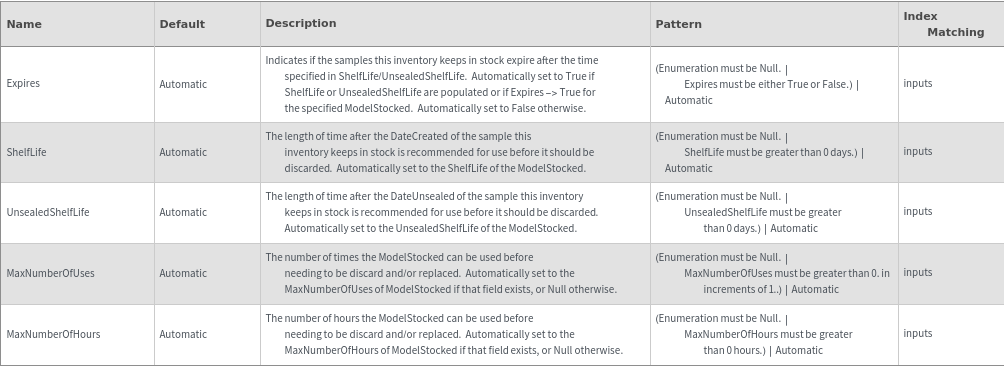
    Organizational Information Options

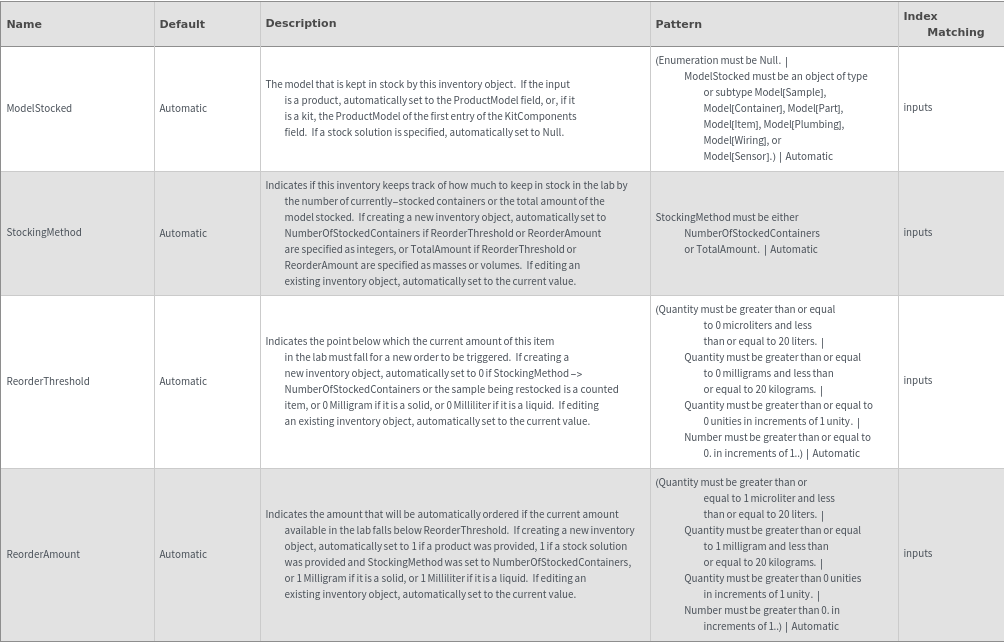
    Restocking Options
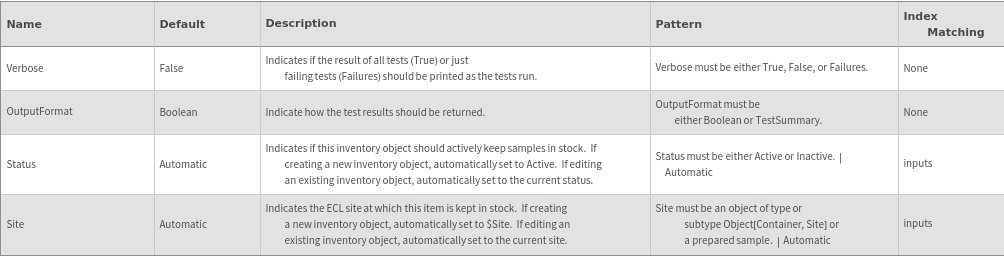
    General Options
Examples

Basic Examples  (5)

Create an Inventory object for the automatic reordering of a kit product:

Create an Inventory object for the automatic reordering of a non-kit product:

Create an Inventory object for the automatic reordering of a stock solution:

Edit the values of an already-existing inventory object:

Edit the values of an already-existing inventory stock solution:


Options  (2)

OutputFormat  (1)

Control the return value of the validity-checking function:

Verbose  (1)

Indicate how failures should be displayed:

Messages  (12)

ExpirationDateMismatch  (2)

If Expires is set to True, then either ShelfLife or UnsealedShelfLife must be resolved to a time:

If Expires is set to False, then ShelfLife and UnsealedShelfLife cannot be specified:

InventoryNameExists  (2)

Throw an error if trying to set the name of an inventory object to one that already exists:

Note that this still happens if trying to rename the object to its own name:

MaxNumberOfUsesInvalid  (1)

MaxNumberOfUses can only be specified for objects that have the MaxNumberOfUses fields:

ModelStockedNotAllowed  (2)

If creating a new inventory for a product, the ModelStocked must be supplied by the specified product:

If editing an existing inventory for a product, the ModelStocked must be supplied by the specified product:

ModelStockedNotNullInvalid  (2)

If editing an inventory for a stock solution, ModelStocked must be Null:

If creating an inventory for a stock solution, ModelStocked must be Null:

ReorderStateMismatch  (1)

ReorderThreshold and ReorderAmount must be compatible with the state of the samples:

StockingMethodInvalid  (2)

If StockingMethod is set to NumberOfStockedContainers, ReorderThreshold and ReorderAmount must be set to integer values:

If StockingMethod is set to TotalAmount for an Object[Product] object, ReorderAmount must still be an integer value:













