
Download
Download[objects]⟹packets
download the objects.
Download[objects, fields]⟹values
downloads only the specified fields of the objects.
Download[objects, fieldLists]⟹values
downloads the sub-list of fields from fieldLists for each of objects at the same position in the list.
Download[references]⟹values
downloads the values from the fields in the given field references.
Details
- Downloading from a packet, instead of an object, will not fetch any new data from the server and will instead lookup values in that packet.
- Downloading a _Packet head and a sequence of fields, instead of a list of fields, will cause a partial packet of values to be returned.
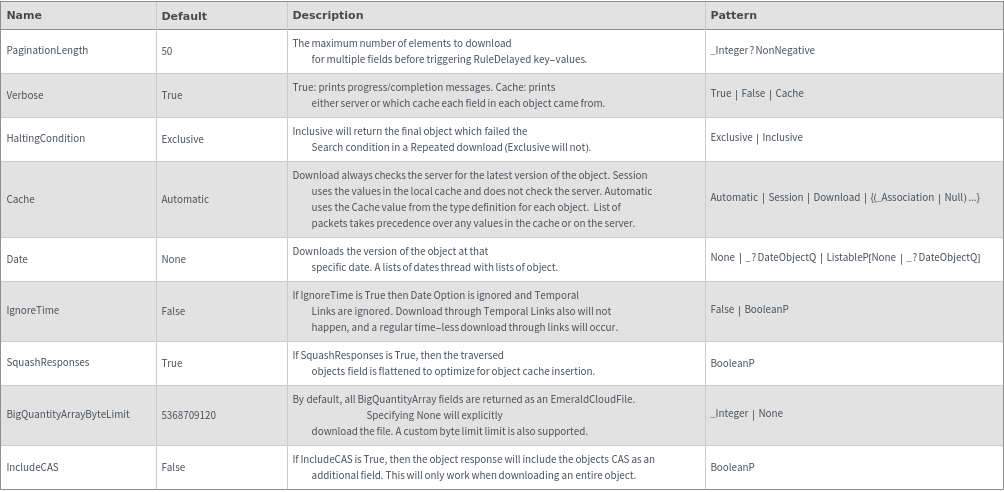
- When the PaginationLength option is specifed and a multiple field has a length greater then that number, the resulting key-value pair is a RuleDelayed call to Download.
- Downloading Null at any index will return Null for that index.
- Downloading $Failed at any index will return $Failed for all fields at that index.
- Download can traverse links using a special syntax: ProtocolsAuthored[Status] will download the Status field from all the objects linked in the ProtocolsAuthored field.
- Download can extract a specific index from an indexed multiple field: StatusLog[[All,2]] will Download all values at index 2 in an indexed multiple field.
- The above can be combined to an arbitrary depth, for example: ProtocolsAuthored[Resources][[All,1]][Model]
- If a Null value is encountered at any point in the link traversal, it will stop and return Null for that node.
- Using the special field "All" will download all the fields in the related packet (for example, Model[All]).
- All must be the last field requested in a change, it cannot be used in the middle of a traversal (Model[All][Name] is invalid).
- The part syntax Contents[[2]] & Contents[[All,2]] are equivalent.
- $CacheSize controls the maximum size (in bytes) of previously downloaded objects which will be cached.
-
HoldRest -
BadCache Packets at positions `1` in the explicit cache do not have object keys, and have been ignored. Please check your syntax and try again. BigDataField There was an error with big data field `1`: `2`. Please update your download request and try again. CloudFile There was a problem downloading a cloudfile. Please try again. CloudFileMetadata There was a problem downloading the metadata for a cloudfile. Please try again. Cycle Cycles detected when downloading the repeated fields `1` for objects `2`. Please update your download request and try again. DateMismatch The provided dates do not match the given input. Either provide a single date to map across every input, or provide a list of dates that match the number of objects in the input. DatePrecedeCreationTime The provided date is before the object creation date. Please verify timestamp does not precede creation time for object. DateTooFarInFuture The provided date is too far in the future. Please update your download request and try again. FieldDefinitionMismatch Field definition of field `1` for object `2` in SLL does not match it's definition in constellation. Download response for this field might be incomplete or wrong. Please make sure the relevant field is SyncType'd correctly FieldDoesntExist Could not find the field(s) `1` in object(s) `2`. Please check your spelling and try again. FieldTooLarge The field(s) `1` in objects(s) `2` are too large and cannot be downloaded directly into the notebook. Please update your download and try again. FileSystemsPermissionsError There was a problem accessing the file system at path `1`. Please make sure that path is accessible to Command Center and try again. InternalError An internal error occurred in the Telescope App. Please file a troubleshooting report. `1` InvalidBigQuantityArrayByteLimit The value `1` for BigQuantityArrayByteLimit is invalid. Please enter an integer and try again. InvalidField Field specifications `1` are invalid. Please correct them and try again. InvalidOption There was an invalid value `1` passed to the option `2`. Please update your request and try again. InvalidSearch Search conditions `1` were provided for downloading fields `2` but are invalid. Must be an expression of And, Or, Greater, Less, LessEqual, GreaterEqual, NotEqual, or Equal and not contain any quantities. Length Cannot download Length of fields `1` from objects `2` because they are not multiple fields. MapThread The provided lengths of `1` (`2`) and `3` (`4`) are unequal. Please correct them and try again. MismatchedType Ids `1` exist in the database, but are not of types `2`. Please update your download request and try again. MissingCacheField Could not find the field(s) `1` in the cache packets for object(s) `2`. Please check your spelling and try again. MissingField Could not find the field(s) `1` in the packets for object(s) `2`. Please check your spelling and try again. MissingObjectKeyword The specified Download is missing Object keyword. Please update your download request and try again. NetworkError The specified Download call failed due to a network error: `1`. Please check your internet connection and try again. NotLinkField Could not Download fields `1` because `2` are not link fields. Please update your download request and try again. ObjectDoesNotExist The following objects could not be found: `1`. Please check confirm these objects exist or if you have access to these objects. PacketLength Cannot download Length inside Packet fields `1`. Please update your download request and try again. PacketWrapperMultipleObjects The Packet wrapper is used for more than one through-link traversal with through-links for `1`. Please separate these into several uses of the Packet wrapper around each traversal separately. Part Parts `1` of fields `2` do not exist for objects `3`. Please check your syntax and try again. RedundantField Fields `1` are equivalent to Packet[All]. Please consider updating your download request. Timeout The Constellation request did not finish computing in `1` minutes and was aborted due to timeout. Please contact the platform team, and in the meantime try to partition and send your request in smaller chunks TransientNetworkError There was a problem communicating with constellation. Please check your network connection and run your code again. UnknownType Types `1` are not defined. Please check your spelling and try again. UnparsableDownloadError There was a problem parsing your download request. Please check the syntax of your request and try again. UnusedSearchConditions Search conditions `1` were provided for downloading fields `2`, but these fields are not Repeated and thus search conditions are irrelevant.
Input

Output

General Options
Attributes
Messages
Examples
Basic Examples (3)





Additional Examples (61)
Download a field through a link:


Download a field through a link and another field at the same time:


Download a set of fields from a list of objects and/or links:

Download with Time respects Timeless Objects. (Historical value was 1 degree):


Download with Time respects Timeless Object through a Link. (Historical value was 1 degree):



Field Reference (4)








Fields (1)


Length (3)









Nested Lists (5)










Null (5)
Downloading a list of fields from a list of objects where some indices are Null returns Null for those indices:


Downloading a list of fields from Null returns Null:


Downloading a list of objects where some indices are Null returns Null for those indices:


Downloading Null returns Null:

With _Packet, Downloading a list of fields from a list of objects where some indices are Null returns Null for those indices:


Packet (12)
Download fields into a Packet :


Downloading additional fields from Repeated using Packet returns a packet for each set of fields:


Downloading a List[List[objects]] with a List[List[___Packet]] of fields works:


Downloading a List[objects] with a List[List[___Packet]] of fields works:


Downloading a list of both fields and Packets of fields works:


Downloading one object with a List[List[___Packet]] of fields works:


Downloading using Repeated & Packet returns a packet at each level:


Downloading with a list of fields and Packets of fields, returns a list of some packets and some values:


Downloading with a list of Packet of fields, for a list of lists of objects, works (depth: 2,2):


Downloading with a list of Packets of fields, instead of a list of lists of fields, returns a list of packets:


Downloading with an empty Packet of fields returns a packet of default fields:


Download through links and get back a packet with the specified fields:


Packets (2)




Repeated (2)







Search Conditions (3)








SubValues (3)




Traversal (3)






VariableUnit (2)












Options (15)
BigQuantityArrayByteLimit (1)



Cache (6)
Cache->Automatic uses the value of Cache in the type definition for each object:


Cache->packets will go to the server for fields missing in a packet provided via the option but still throw messages:



Cache->packets will use historic values provided by the packets:


Cache->packets will use the values in the packets, providing messages for any missing keys, when given a list of FieldReferences:


Cache->Session forces subsequent Download calls to refer to the local cache without checking the server for changes:


Test - Cache->Download always checks the server for the latest version of the object regardless the object was cached with Session:


Date (3)
A list of dates threads across a list of objects:


Date Option allows the user to download an Object as it looked at a specific time. Note a single date can apply across a list of objects:

Whenever a Temporal Link is Downloaded, the Cache option is ignored and the values are downloaded directly from the Database:




































































