
ecl-logo Documentation

UploadMolecule

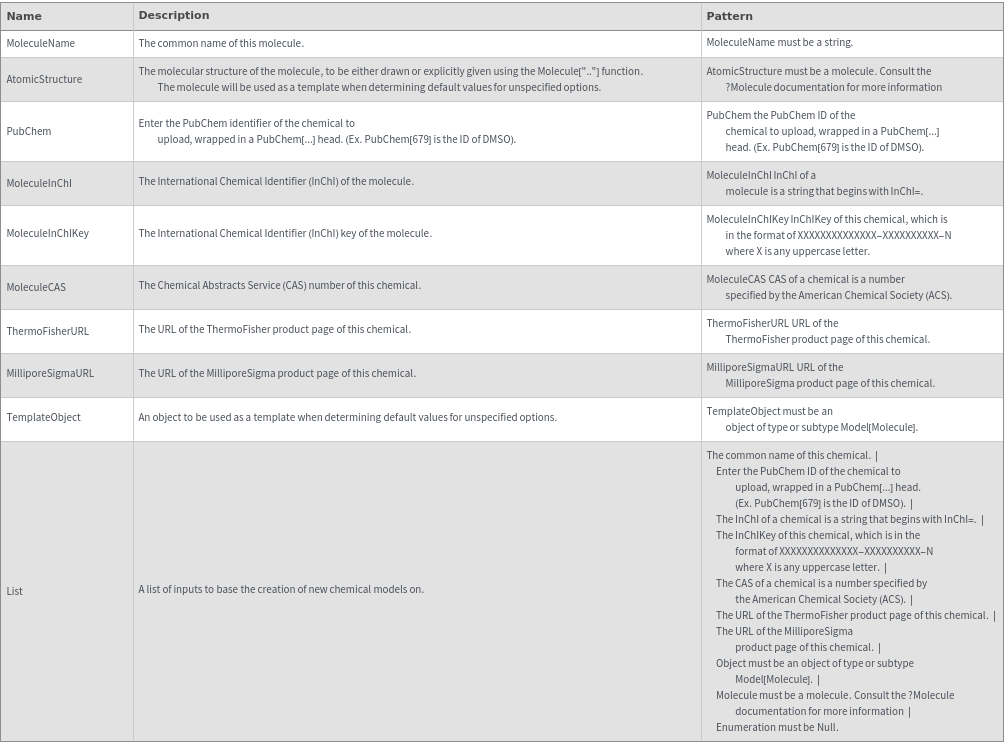
UploadMolecule[MoleculeName]Molecule

returns a model Molecule that contains the information given about the chemical sample.

UploadMolecule[AtomicStructure]Molecule

returns a model Molecule based on the provided options and the structure specified by 'myMolecule'. The molecular structure of 'myMolecule' can be either drawn or explicitly given using the Molecule[".."] function.

UploadMolecule[PubChem]Molecule

returns a model Molecule that contains the information given about the chemical sample.

UploadMolecule[MoleculeInChI]Molecule

returns a model Molecule that contains the information given about the chemical sample.

UploadMolecule[MoleculeInChIKey]Molecule

returns a model Molecule that contains the information given about the chemical sample.

UploadMolecule[MoleculeCAS]Molecule

returns a model Molecule that contains the information given about the chemical sample.

UploadMolecule[ThermoFisherURL]Molecule

returns a model Molecule that contains the information given about the chemical sample.

UploadMolecule[MilliporeSigmaURL]Molecule

returns a model Molecule that contains the information given about the chemical sample.

UploadMolecule[TemplateObject]Molecule

returns a model Molecule based on the provided options and the values found in TemplateObject.

UploadMolecule[]Molecule

returns a model Molecule that contains the information given about the chemical sample.

UploadMolecule[List]Molecules

returns an index-matched list of 'Molecules' that contains the information given about the chemical sample, based on the given list List.

Details

    Input
    Output

    Analysis & Reports Options

    Compatibility Options
    Health & Safety Options
    Input Processing Options

    Organizational Information Options
    Physical Properties Options
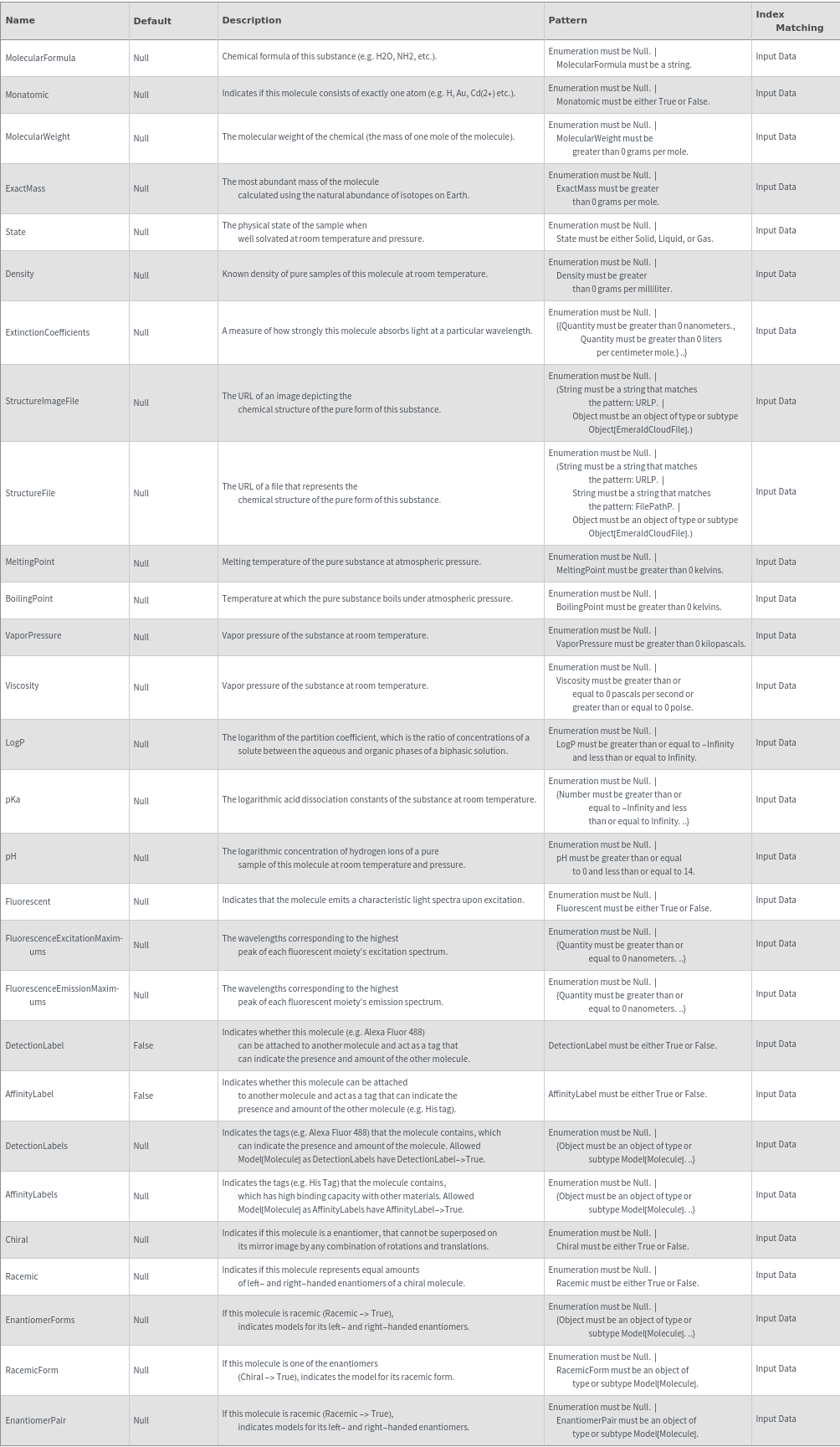
    Storage Information Options

Examples

Basic Examples  (5)

Upload a new Model[Molecule] of Allylamine by its Sigma Aldrich product URL:

Upload a new Model[Molecule] of Arginine by its CAS:

Upload a new Model[Molecule] of Aspartic Acid by its PubChem ID:

Upload a new Model[Molecule] of DMSO by its name:

Upload a new Model[Molecule] of L-Serine by its InChI:

Additional Examples  (4)

Upload a new Model[Molecule] of DMSO by its ThermoFisher product URL:

Upload a new Model[Molecule] of Taxol by its InChI Key:

Upload a new Model[Molecule] of Water by its Molecule:

Use the listable version of UploadMolecule to upload multiple chemicals:

Options  (58)

Acid  (1)

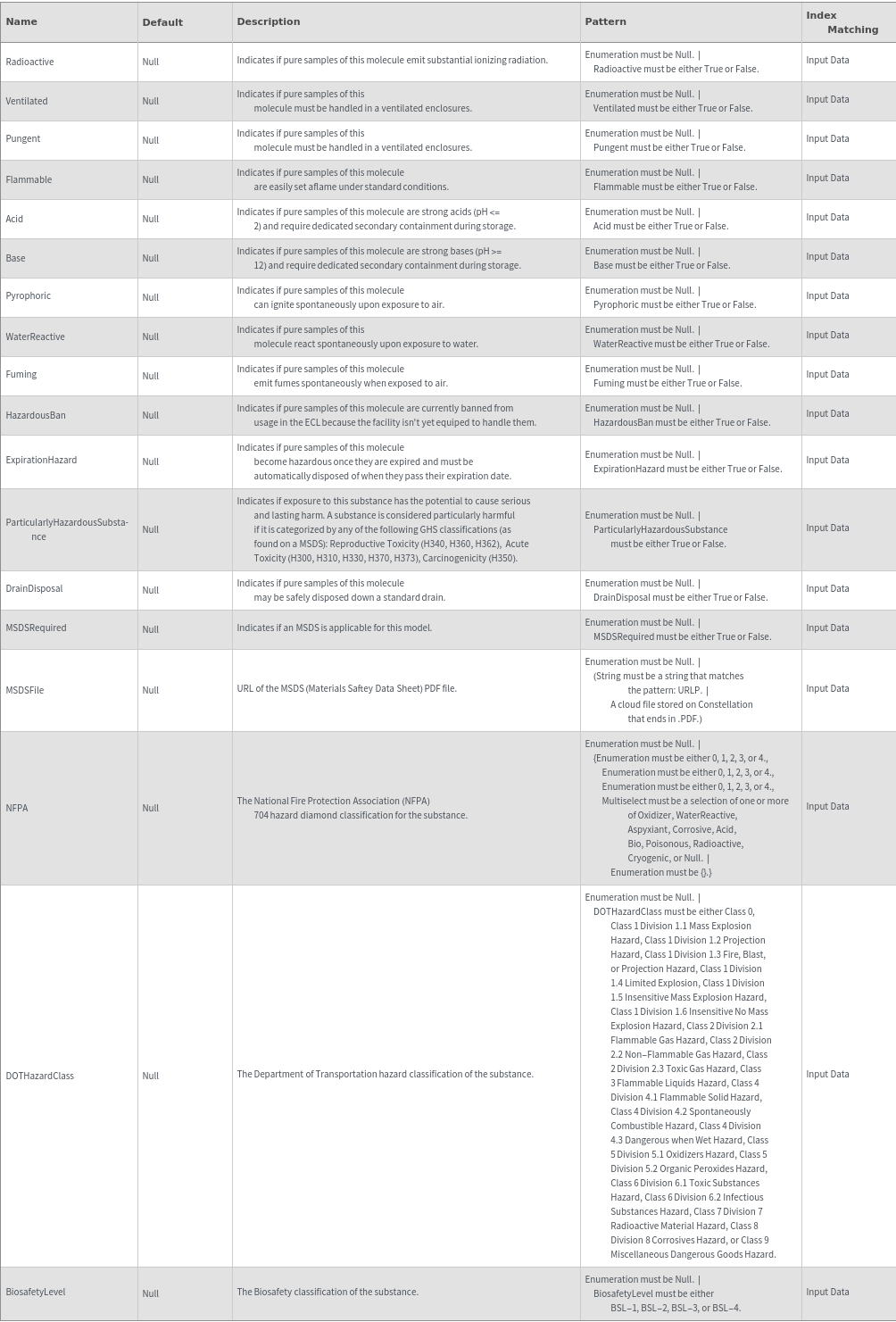
Use the Acid option to specify that the chemical is a strong acid:

AffinityLabel  (1)

Indicates whether this molecule can be attached to another molecule and act as a tag that can indicate the presence and amount of the other molecule (e.g. His tag):

AffinityLabels  (1)

Indicates the tags (e.g. biotin) that the molecule contains, which has high binding capacity with other materials:

Base  (1)

Use the Base option to specify that the chemical is a strong base:

BiosafetyLevel  (1)

Use the BiosafetyLevel option to specify the biosafety level of this chemical sample. The valid value of this options can be found by evaluating BiosafetyLevelP ("BSL-1","BSL-2","BSL-3","BSL-4"). The following chemical (purified water) has a classification of "BSL-1":

BoilingPoint  (1)

Use the BoilingPoint option to provide the temperature at which the liquid form of DMSO will evaporate:

CAS  (1)

Use the CAS option to set the CAS number of this uploaded chemical:

Chiral  (1)

If a sample is a enantiomer, that cannot be superposed on its mirror image by any combination of rotations and translations:

Density  (1)

Use the Density option to set the density of this uploaded chemical:

DetectionLabel  (1)

Indicates whether this molecule (e.g. Alexa Fluor 488) can be attached to another molecule and act as a tag that can indicate the presence and amount of the other molecule:

DetectionLabels  (1)

Indicates the tags (e.g. Alexa Fluor 488) that the molecule contains, which can indicate the presence and amount of the molecule:

DOTHazardClass  (1)

Use the DOTHazardClass option to set the DOT Hazard Class of this uploaded chemical. The valid values of this option can be found by evaluating DOTHazardClassP. The following chemical is part of DOT Hazard Class 9:

DrainDisposal  (1)

Use the DrainDisposal option to specify that this chemical sample can be safely disposed down a standard drain:

EnantiomerForms  (1)

If this molecule is racemic (Racemic -> True), indicates models for its left- and right-handed enantiomers.

EnantiomerPair  (1)

If this molecule is one of the enantiomers (Chiral -> True), indicates the model for its racemic form.

ExactMass  (1)

Use the ExactMass option to set the exact mass of this uploaded chemical:

Expires  (1)

Use the Expires option to indicate if this chemical expires:

ExtinctionCoefficients  (1)

Use the ExtinctionCoefficients option to set the Extinction Coefficient of this uploaded chemical. This field is in the format {{Wavelength,ExtinctionCoefficient}..}:

Flammable  (1)

Use the Flammable option to specify that the chemical is flammable:

Fluorescent  (1)

Use the Fluorescent option to specify that the molecule is fluorescent:

Fuming  (1)

Use the Fuming option to specify that the chemical sample produces fumes when exposed to air:

HazardousBan  (1)

Use the HazardousBan option to indicate that samples of this model are currently banned from usage in the ECL because the facility isn't yet equipped to handle them:

InChI  (1)

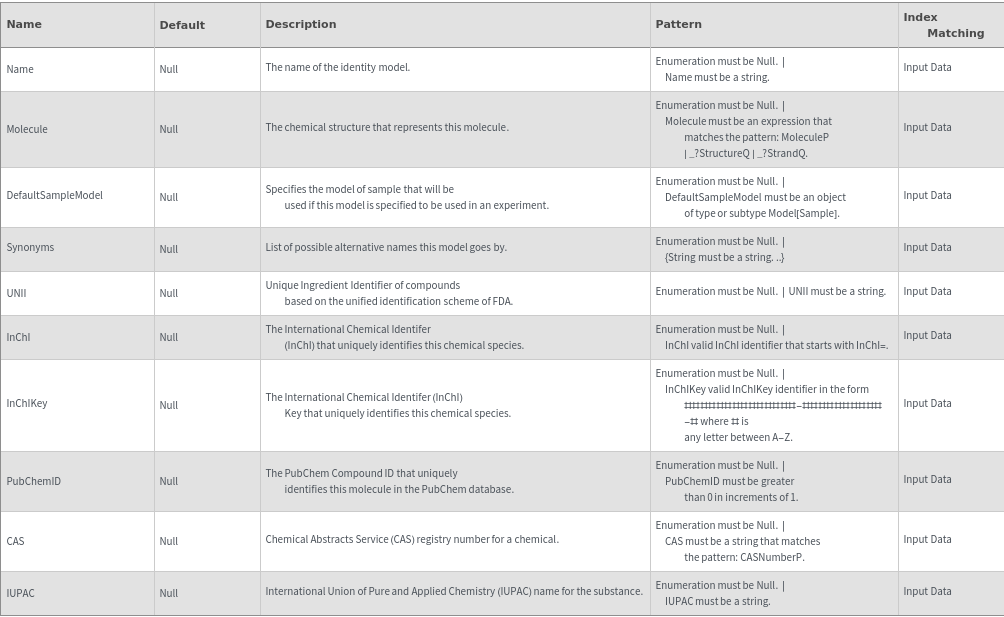
Use the InChI option to set the InChI of this uploaded chemical. InChI is a unique chemical identifier for a chemical, each chemical has a unique InChI:

InChIKey  (1)

Use the InChIKey option to set the InChIKey of this uploaded chemical. InChIKey is a unique chemical identifier for a chemical, each chemical has a unique InChIKey:

IncompatibleMaterials  (2)

Use the IncompatibleMaterials option to specify the list of materials that would become damaged if wetted by this chemical sample. Use MaterialP to see the materials that can be used in this field. Specify {None} if there are no IncompatibleMaterials:


Use the IncompatibleMaterials option to specify the list of materials that would become damaged if wetted by this chemical sample. Use MaterialP to see the materials that can be used in this field. Specify {None} if there are no IncompatibleMaterials:


IUPAC  (1)

Use the IUPAC option to set the IUPAC name of this uploaded chemical:

LightSensitive  (1)

Use the LightSensitive option to specify if the chemical sample is light sensitive and special precautions should be taken to make sure that the sample is handled in a dark room:

LiquidHandlerIncompatible  (1)

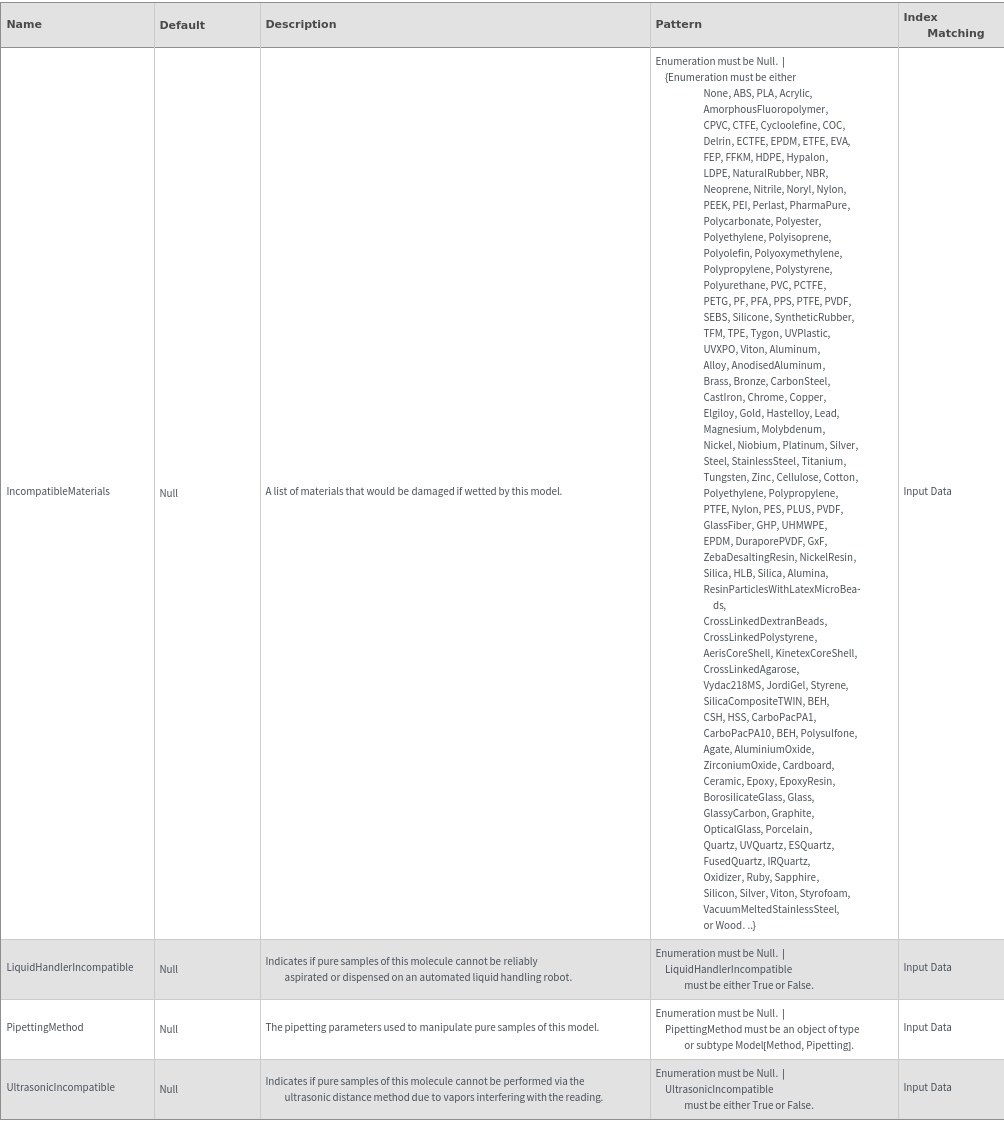
Use the LiquidHandlerIncompatible option to specify that the chemical sample cannot be reliably aspirated or dispensed by a liquid handling robot. In the following example, Methanol cannot accurately be aspirated by a liquid handling robot so LiquidHandlerIncompatible->True:

MeltingPoint  (1)

Use the MeltingPoint option to provide the temperature at which the solid form of Tyrosine will melt:

MolecularFormula  (1)

Use the MolecularFormula option to set the Molecular Formula of this uploaded chemical:

MolecularWeight  (1)

Use the MolecularWeight option to set the Molecular Weight of this uploaded chemical:

Monatomic  (1)

Indicates if this molecule contains exactly one atom.

MonomerSymbol  (1)

Use the MonomerSymbol option to set the monomer symbol of this uploaded chemical. The MonomerSymbol field is used when constructing higher level macromolecules:

MSDSFile  (1)

Use the MSDSFile option to specify the URL of the MSDS PDF file for this chemical sample. The MSDSFile must be a URL that points to a PDF file. The PDF file will be downloaded and stored in Constellation on creation of this chemical model:

MSDSRequired  (1)

Use the MSDSRequired option to indicate that an MSDS file must be supplied for this chemical sample. An MSDS file is required by SLL the chemical is detected to be hazardous, however, it is best to always provide an MSDS when possible:

Name  (1)

Use the Name option to set the name of this uploaded chemical:

NFPA  (2)

Use the NFPA option to specify the National Fire Protection Association (NFPA) 704 Hazard diamond classification of this substance. This option is specified in the format {HealthRating,FlammabilityRating,ReactivityRating,SpecialConsiderationsList}. The valid symbols to include in SpecialConsiderationsList are Oxidizer|WaterReactive|Aspyxiant|Corrosive|Acid|Bio|Poisonous|Radioactive|Cryogenic|Null. The following chemical, formaldehyde, as an NFPA of {3,0,0,{Radioactive}} which means that its Health rating is 3, its Flammability rating is 0, and its Reactivity rating is 0. The special consideration of this chemical is that it is radioactive:


Use the NFPA option to specify the National Fire Protection Association (NFPA) 704 Hazard diamond classification of this substance. This option is specified in the format {HealthRating,FlammabilityRating,ReactivityRating,SpecialConsiderationsList}. The valid symbols to include in SpecialConsiderationsList are Oxidizer|WaterReactive|Aspyxiant|Corrosive|Acid|Bio|Poisonous|Radioactive|Cryogenic|Null. The following chemical, water, has an NFPA of {0,0,0,{}} which means that its Health, Flammability, and Reactivity ratings are 0 and there are no special considerations to take into account:


ParticularlyHazardousSubstance  (1)

Use the ParticularlyHazardousSubstance option to specify that special precautions should be taken in handling this substance. This option should be set if the GHS Classification of the chemical is any of the following: Reproductive Toxicity (H340, H360, H362), Acute Toxicity (H300, H310, H330, H370, H373), Carcinogenicity (H350):


pKa  (1)

Use the pKa option to specify the logarithmic acid dissociation constant of Glycine:

Pungent  (1)

Use the Pungent option to indicate that the sample has a strong odor:

Pyrophoric  (1)

Use the Pyrophoric option to specify that the chemical ignites spontaneously with contact with air:

Racemic  (1)

If a sample is a racemic compound, this field represents equal amounts of left- and right-handed enantiomers of a chiral molecule.:

RacemicForm  (1)

If this molecule is one of the enantiomers (Chiral -> True), indicates the model for its racemic form.

Radioactive  (1)

Use the Radioactive option to specify if the chemical sample is radioactive:

State  (1)

Use the State option to set the state of matter (Solid, Liquid, Gas) of this uploaded chemical:

StructureFile  (1)

Use the StructureFile option to provide the URL of a MOL file of the chemical's structure:

StructureImageFile  (1)

Use the StructureImageFile option to provide an image of the chemical's structure:

Synonyms  (1)

Use the Synonyms option to set the synonyms of this uploaded chemical:

UltrasonicIncompatible  (1)

Use the UltrasonicIncompatible option to specify that volume measurements of samples of this model cannot be performed via the ultrasonic distance method due to vapors interfering with the reading:

UNII  (1)

Use the UNII option to set the UNII of this uploaded chemical:

VaporPressure  (1)

Use the VaporPressure option to provide the equilibrium pressure of DMSO when it is in thermodynamic equilibrium with its condensed phase:

Ventilated  (1)

Use the Ventilated option to specify that the chemical sample needs to be handled in a ventilated enclosure:

Viscosity  (1)

Use the Viscosity option to provide Water's internal friction, measured by the force per unit area resisting a flow between parallel layers of liquid:

WaterReactive  (1)

Use the WaterReactive option to specify that the chemical reacts violently with contact with water:

ModifyInputModel  (2)

When a Model[Molecule] is used as input, set this option to False to use the input molecule as a template and upload a new molecule object:

When a Model[Molecule] is used as input, set this option to True to modify the input molecule:

Messages  (2)

Error::APIConnection  (1)

If the given URL cannot be connected, throw errors.

VentilatedRequired  (1)

If a sample is marked as Pungent it must be set to Ventilated:

Last modified on Mon 24 Jun 2024 20:26:04
























































































































